More online protection with the new VPN by Google One
We’ve all done it. You’re sitting in a cafe browsing your favorite online store and you enter your credit card number while connected to an unsecured Wi-Fi network. While convenient, a public Wi-Fi network may be less secure than your personal one. This can put your personal information at risk of theft from hackers.
To give you peace of mind that your data is safe, we’re announcing the new VPN by Google One on our 2 TB and higher plans to provide an extra layer of online protection for your Android phone.
We already build advanced security into all our products, and the VPN extends that security to encrypt all of your phone’s online traffic, no matter what app or browser you’re using. The VPN is built into the Google One app, so with just one tap, you can rest assured knowing your connection is safe from hackers.
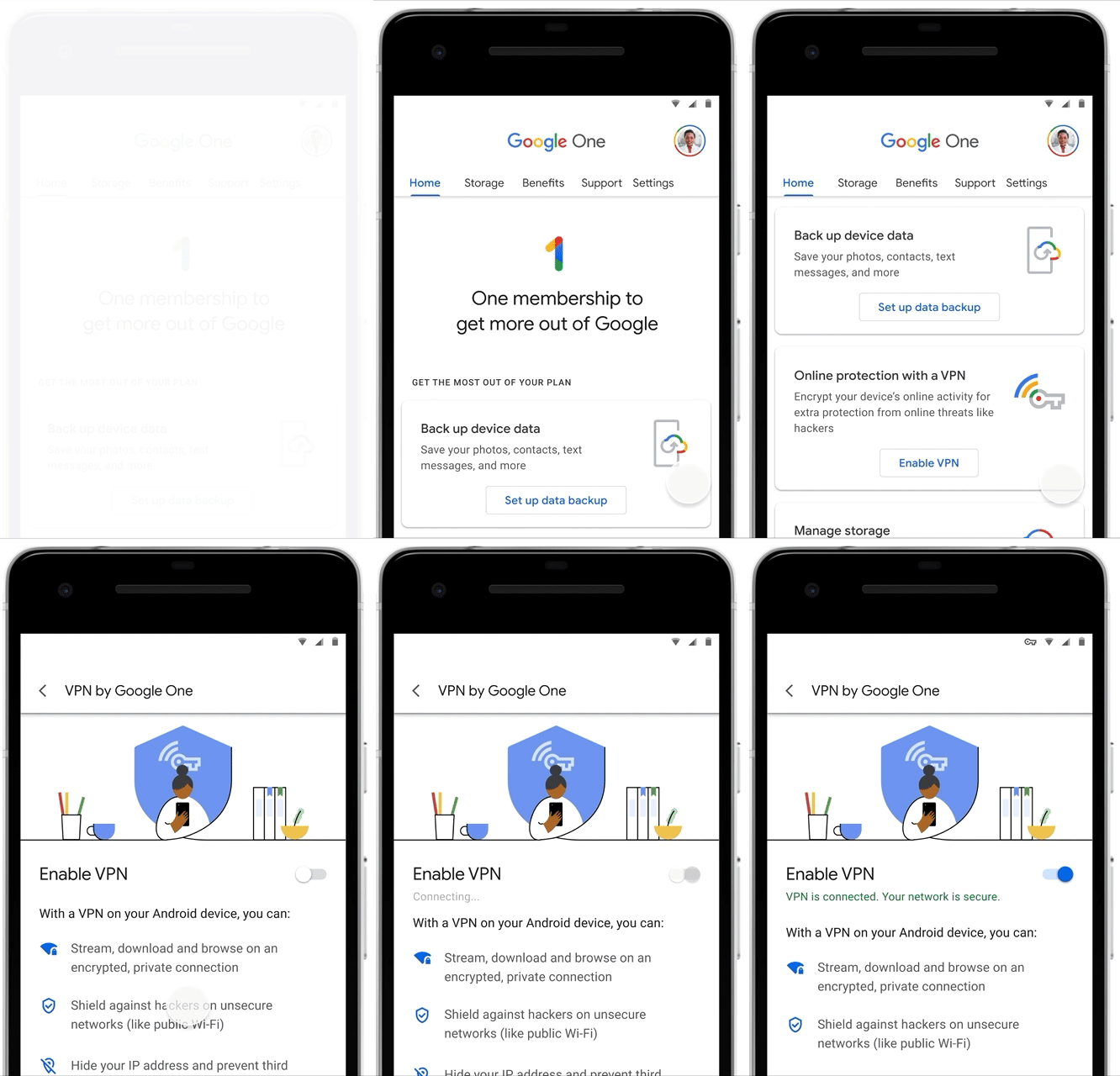
We’re also now rolling out Pro Sessions by Google One with VPN support. With Pro Sessions, you can schedule one-on-one online sessions with a Google expert to learn more about VPNs and how to stay safer online. You’ll get access to the VPN and Pro Sessions in addition to the 2 TB of storage and other member benefits you already get with the plan, like 10 percent back in store credit on all Google Store device purchases. Plus, if you’ve shared your 2 TB Google One plan with family members (up to five additional people), they can also enable the VPN on their own devices at no extra cost. These are just a few more ways that a Google One membership helps you get the most out of Google with more peace of mind and helpful experiences.
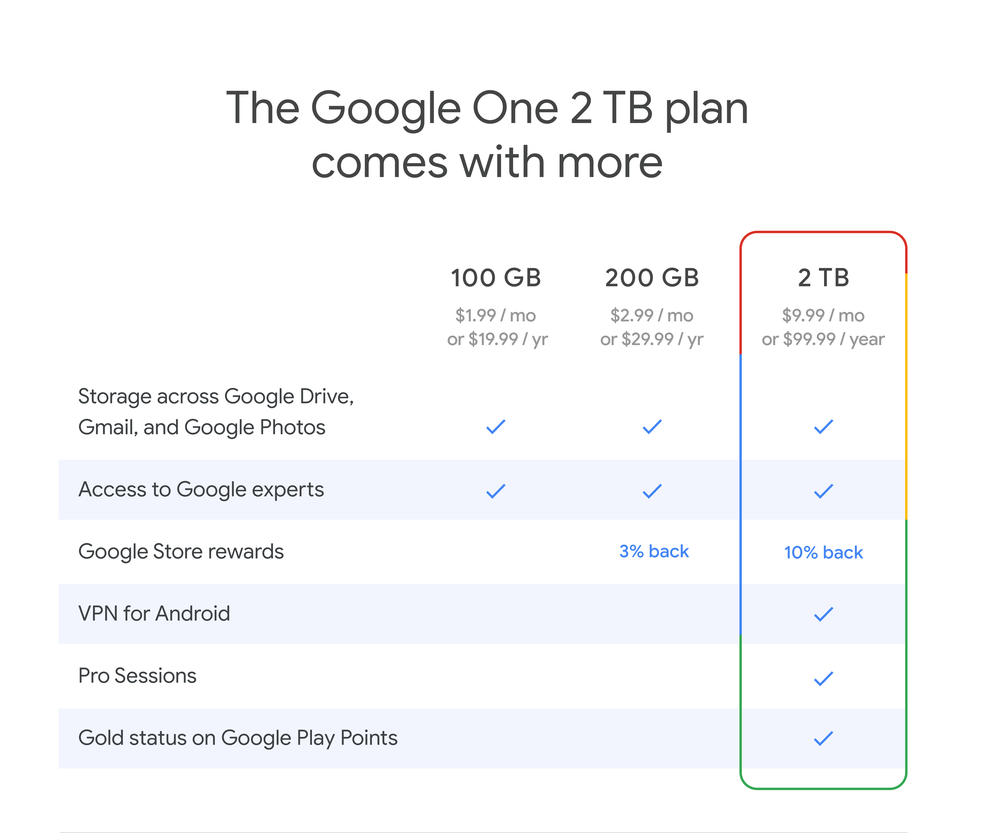
Google Store rewards give you Store credit on hardware purchases from the Google Store. This is only available in U.S., Canada, Australia, Germany and United Kingdom. One thing to note on Pro Sessions: there are limited appointments available on a first come, first served basis.
The VPN by Google One will roll out in the United States in the coming weeks through the Google One app (Android only) and will expand to more countries and to iOS, Windows and Mac in the coming months. Pro Sessions will also be available in the coming weeks to all 2 TB members in the United States, United Kingdom and Canada.
If you’re not already a member, you can sign up for a 2 TB Google One plan here.

via Android https://ift.tt/3e86iZY

What to expect in Series 2 of the Apps, Games & Insights podcast
Can apps become the key to education?
Interest in e-learning has been growing over the last few years but, with the emergence of distance learning, it’s poised to change all types of education. In the first episode, we talk with Elliott Rayner, Head Of Product Marketing, and John Quintana, Head of Guided Learning Experiences, from online language learning developer Babbel. Elliott and John discuss how Babbel is transforming and "thinking big" about the future of education: Can apps take the place of traditional classroom education? How can we make new models of language learning effective across various needs and learning styles?
How do you get 250 million players to take action on climate change?
The recent Green Games Jam brought together 11 games studios to find engaging ways to educate and empower 250 million players to take action on climate change. Jennifer Estaris, Game Director at SYBO Games and Deborah Mensah-Bonsu, Founder of Games for Good and formerly from Space Ape Games, explain what the game jam is really about and how others can raise awareness to fight climate change through their businesses. They also share new approaches to climate change education led to planting trees, saving wolves and more.
How do you create a successful 4x strategy game?
If you ever played one of those games where you build an empire, you’ve been playing a 4x strategy game. We hear from David Eckleberry, General Manager for Star Trek Fleet Command and Vice President at Scopely, about how they successfully built a loyal player base. Alongside Howard Chen, Google Play Growth Consultant, they shed light on how to create games that find and keep players, and discuss player affinity and KPI growth.
How do you reflect humanity’s diversity in an app?
Drops CEO and Co-Founder Daniel Farkas and Chief Customer Officer Drew Banks join us to explain how they work with native speakers and language experts to bring awareness and encourage people to learn a less spoken language. Daniel and Drew also discuss their initiatives to make the app more inclusive and accessible to all, such as by reviewing the depiction of women in graphics used to support word learning.
How do businesses build quality into an app?
Imagine the scenario: after downloading a great app or game, you find that it’s not quite the great experience you were hoping for, or worse, it keeps misbehaving and crashing. For developers and businesses, delivering a quality app is essential for both acquiring and retaining users. To explore how developers can ensure that users are getting the quality experiences they deserve, we’re joined by Maria Neumayer, Staff Software Engineer, at food delivery service Deliveroo, who talks about how Deliveroo has adapted during COVID-19, and Shobhit Chugh, Product Manager, Firebase, who discusses how businesses can rectify quality problems in testing and production.
Why are your favorite games getting smaller these days?
Well ok, not necessarily smaller per se, but games are being taken to the small screen.. You’ve probably noticed that many of your favorite PC and console games are now appearing on your mobile phone and tablet. Game developers want to give you the opportunity to stay engaged with your favorite game throughout the day, whether you’re on the move, or away from your computer or games console. However, going mobile can be challenging, so we speak to Jen Donahoe, Marketing and Growth Lead - Teamfight Tactics at Riot Games who enlightens us on how they develop mobile games and keep their players happy.
How do apps help people overcome failures to achieve life goals?
It can be a struggle to change habits, such as diet and exercise, with the goal of living a healthier life. Keeping people motivated through the ups and downs of lifestyle changes is a core challenge for health and fitness app developer Lifesum. Marcus Gners, Chief Strategy Officer and Co-founder at Lifesum, together with best-selling author of “Hooked” and “Indistractable,” Nir Eyal, explore the ways apps can help make sure people don’t fall off the wagon, and remain motivated to achieve their goals.
We don’t want to give the whole game away, so we are keeping the details of our final episode under wraps. Keep an eye out for more details shortly.
How to stay tuned in
Listen to the first episode of series 2 here. Subscribe to the podcast and listen to the latest episodes on your favorite podcast platforms including Spotify, Apple, Libsyn, Google Podcasts, Pocket Casts and Overcast.
Also, keep an eye out on @GooglePlayDev and @AndroidDev on Twitter where we will be announcing the launch of each new episode of the Apps, Games, & Insights podcast.

via Android https://ift.tt/31FoBAX
'Hey Google' now works with your Android apps
Google Assistant helps people get things done every day—and for people using Android phones, mobile apps are often the best way to help with tasks. So today, we’re extending the convenience of simple Assistant voice commands to work with your favorite Android apps.
Opening and searching within Android apps using “Hey Google” is now available to all Assistant-enabled Android phones. This makes everyday tasks within an app much easier thanks to voice. For example, you can now say, “Hey Google, search cozy blankets on Etsy” and get right to what you’re looking for. Or if you’re looking for something (or someone) specific within an app, just say, “Hey Google, open Selena Gomez on Snapchat.”
But people do a lot more with their apps beyond simply opening and searching within apps, and we want to enable voice commands to those frequent tasks, too. Now you can do things like playing music, starting a run, posting on social media, ordering food, paying back a friend, hailing a ride—the list goes on and on—all with just your voice. Starting today, you can try doing more using your voice with more than 30 of the top apps on Google Play available in english globally, with more apps coming.
Here are a few things you can try today:
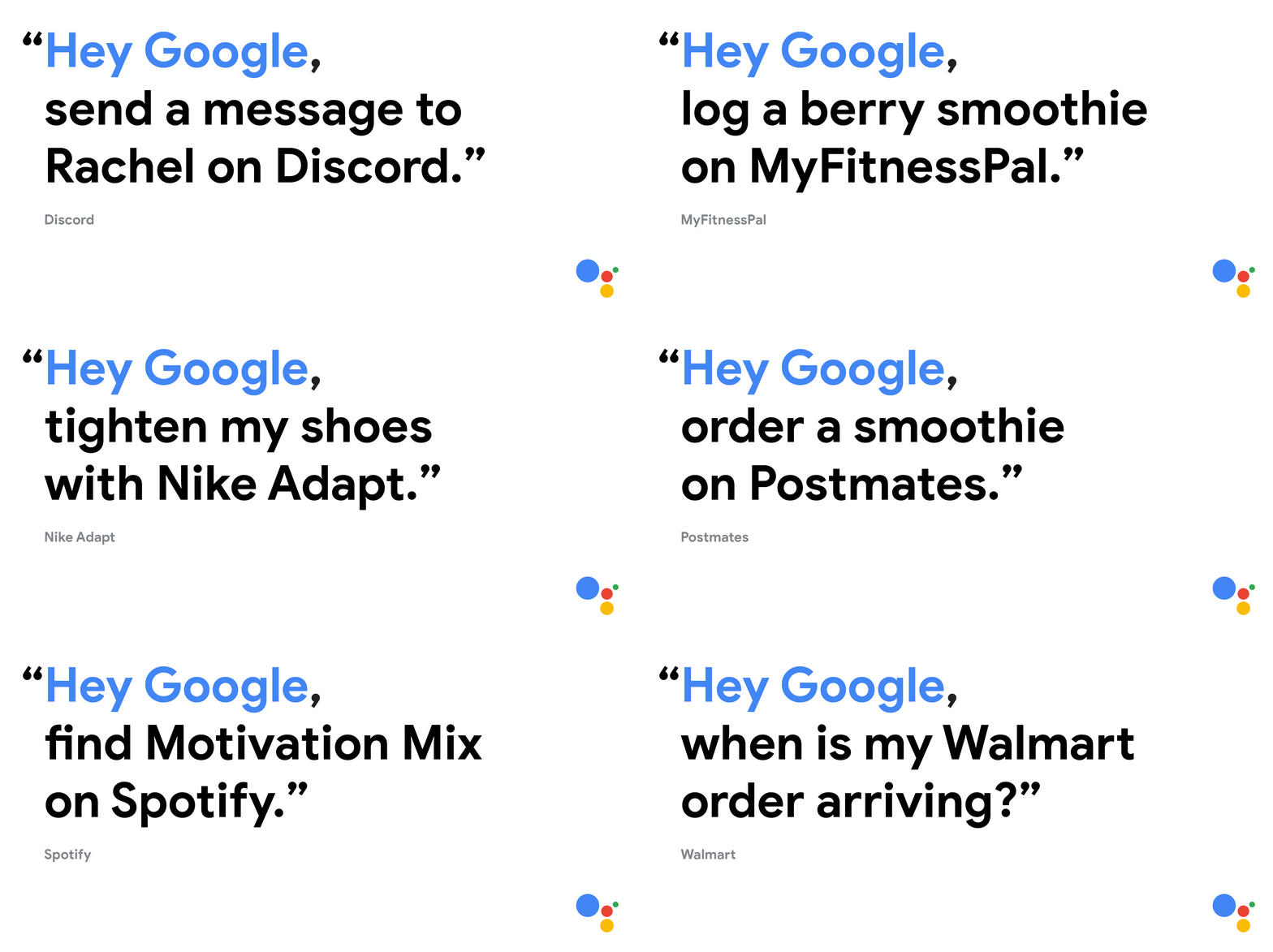
And for your most common tasks, you can create custom shortcut phrases. So instead of saying “Hey Google, tighten my shoes with Nike Adapt,” you can create a shortcut to just say, “Hey Google, lace it.” You can explore suggested shortcuts or create your own by simply saying, "Hey Google, show my shortcuts" to get to the settings screen.
Whether you want a hands-free way to use your apps or shortcuts to complete common tasks, we want to make Android and your apps even more useful and convenient—and to give you time back to enjoy what matters most.

via Android https://ift.tt/30J595W
Important household sounds become more accessible
Appliances beeping. Water running. Dogs barking. These are all sounds that are meant to grab your attention when something important is happening. But, if you have hearing loss or are wearing headphones, these sounds might not be able to draw your attention like they’re intended to.
Sound Notifications is a new feature on Android that provides push notifications for critical sounds around you. Designed for the estimated 466 million people in the world with hearing loss, Sound Notifications makes important and critical household sounds more accessible with push notifications, a flash from your camera light, or vibrations on your Android phone. This feature can also be helpful if someone is unable to hear temporarily as a result of an injury, wearing earplugs or headphones.
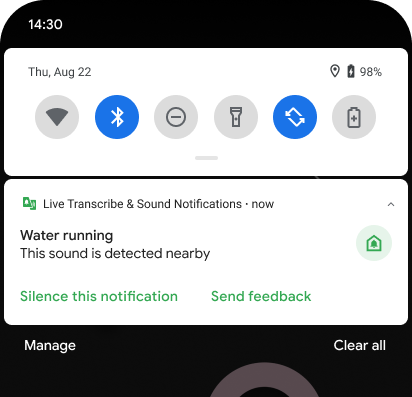
Receive real-time push notifications of critical sounds around you.
Sound Notifications works with other devices, including Wear OS by Google smartwatches. You can get text notifications with vibrations on your wrist when there is important noise detected by your phone. That way you can continue to get alerts about critical sounds even when you are asleep, a concern shared by many in the deaf and hard of hearing community.
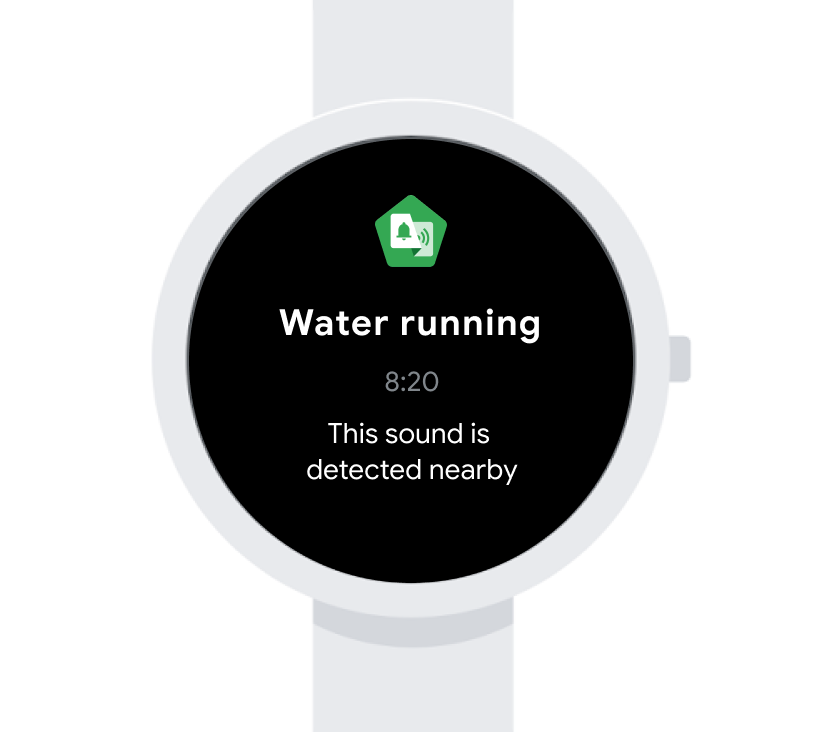
Receive critical sound notifications on other devices, including Wear OS by Google smartwatches.
Developed with machine learning, Sound Notifications works completely offline and uses your phone's microphone to recognize ten different noises—including baby sounds, water running, smoke and fire alarms, appliances beeping and door knocking. This expands our sound detection work in Live Transcribe which shows over 30 sound events alongside real time captions, to provide a better picture of overall sound awareness.
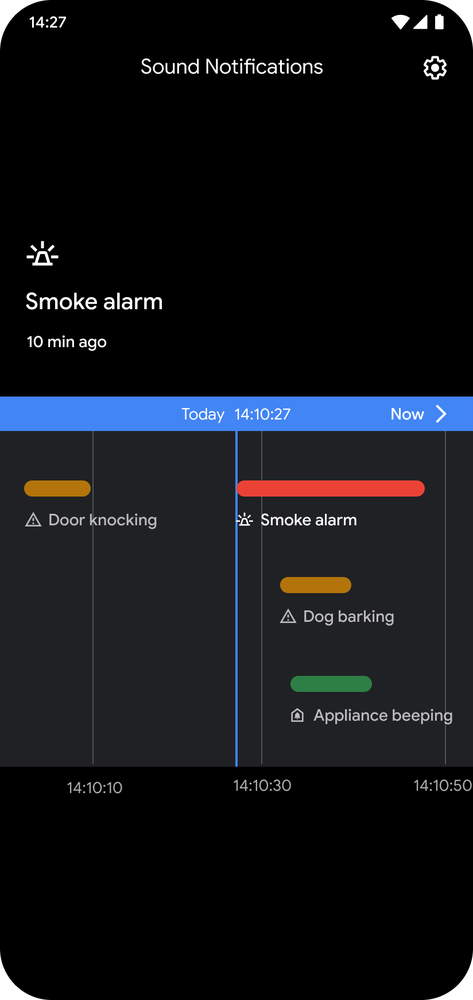
Use Timeline view to scroll through a snapshot of detected sounds from the past few hours.
While we can notify you about baby sounds or dog barking, it often helps to know more about the preceding events that might have caused that disturbance. With the Timeline view, you can scroll through a brief snapshot of detected sounds from the past few hours. This shows when and how long the sound occurred to get a better sense of the sound’s importance. So if the dog has been barking because of a siren heard before that for 10 minutes, you can see that.
To start using Sound Notifications, go into Settings, then the Accessibility menu and enable Sound Notifications. If you don’t see this option on your phone, you can download both Live Transcribe and Sound Notifications from Google Play, then go to your settings and turn on Sound Notifications. To learn more about using Sound Notifications, visit the help center.

via Android https://ift.tt/3iQgCH7
6 ways your Android is getting more helpful this fall
It was only a few weeks ago that we released Android 11, the latest version of the operating system. Today, we’re highlighting six of the latest Google features for Android—available even on older versions—that make your life a little easier and more enjoyable this fall.
1. Do even more with Google Assistant and your favorite apps
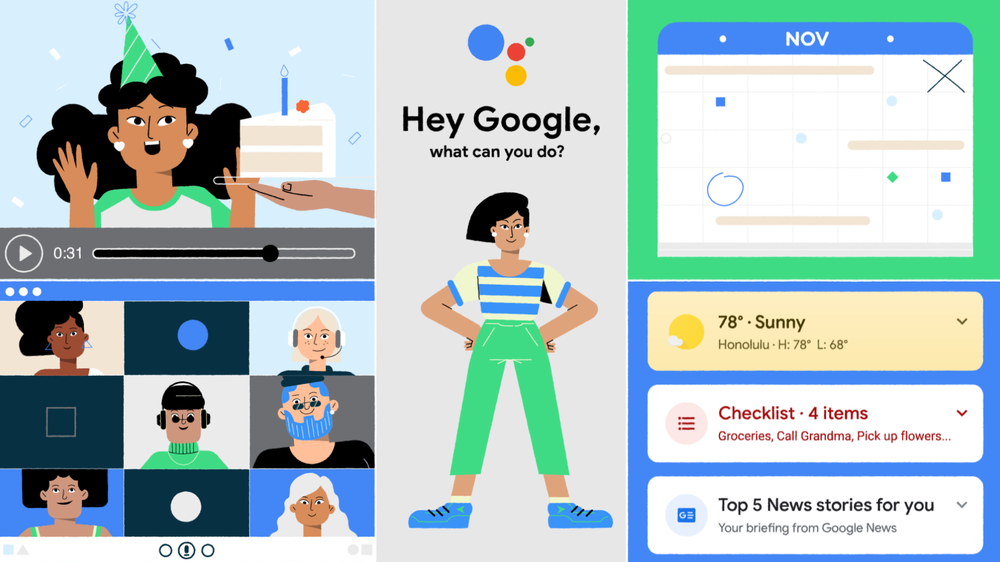
Click on the image above to see the video of Google Assistant working with Android apps
Your Android phone comes with Google Assistant, and now you can ask it to open or search across Android apps. Try saying “Hey Google, send snap with Cartoon Lens” or “Hey Google, log a berry smoothie on MyFitnessPal." We’ve partnered with many of the top apps on Google Play including Walmart, Mint, Spotify, Etsy, and Discord, to do specific tasks unique to those individual apps. Get started by saying, “Hey Google, show my shortcuts.”
2. New ways to connect with Google Duo
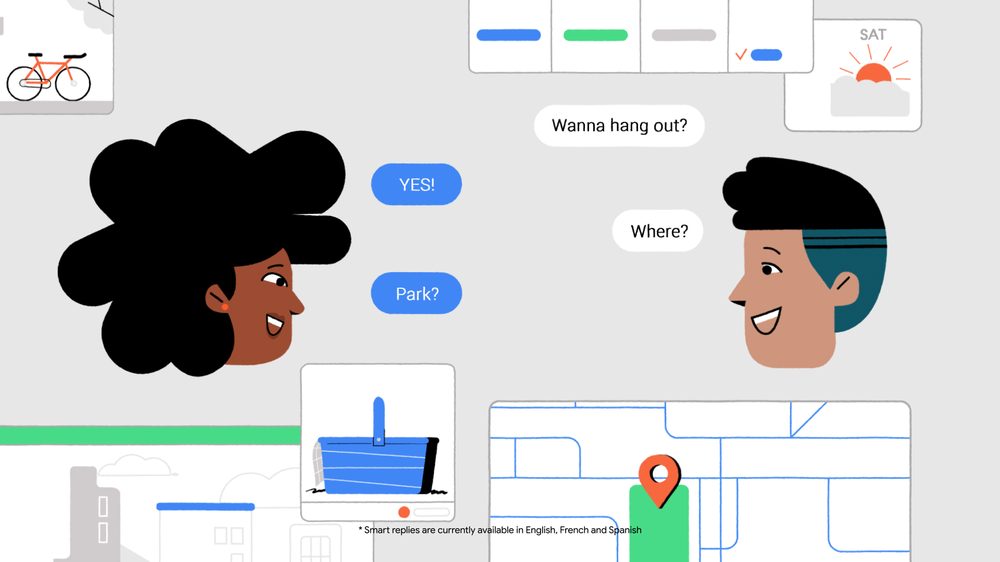
Click on the image above to see the video of screen sharing in Google Duo
When your friends and family video call you with Google Duo, you can now share your screen to browse photos or plan activities together while on the call. If they aren’t catching you at a good time, they can leave a video message, which has automatic captions to help if you have hearing loss or are in a spot where you can’t play audio. Download Google Duo on Google Play.
3. Say goodbye to spam calls with Google’s Phone app
With Google’s Phone app, your Android device will stop spam callers for good and it’ll tell you who’s calling and why. We’ve been working to bring the app to more people, and it’s now available to download for the first time on most Android devices running Android 9 or above. Download Phone by Google on Google Play to get spam protection and other helpful features, and easily connect with friends and family no matter what type of devices they use.
4. New tools for hearing loss with Sound Notifications
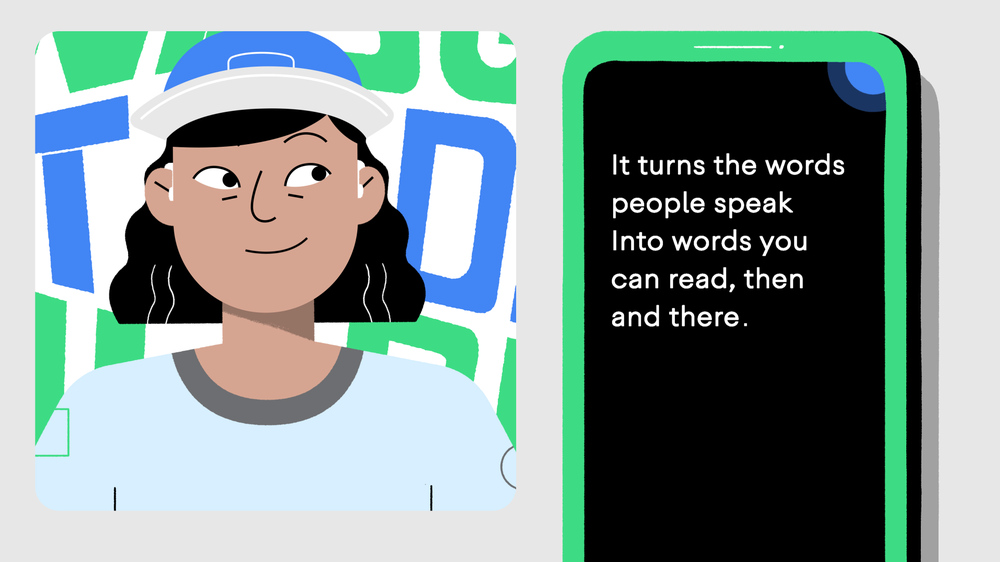
Click on the image above to see the video of Sound Notifications
Sound Notifications flags important, inconvenient, or alarming noises around you when you have hearing loss or are even wearing headphones. Set up Sound Notifications in the Live Transcribe app, and your phone will flash, vibrate, and provide push notifications when it detects a fire alarm, a door knocking, household appliance beeps, and more. You can also set up your Android Wear watch to vibrate and send a push notification, as well. Download Live Transcribe on Google Play.
5. Communicate with Action Blocks when you don’t use your voice
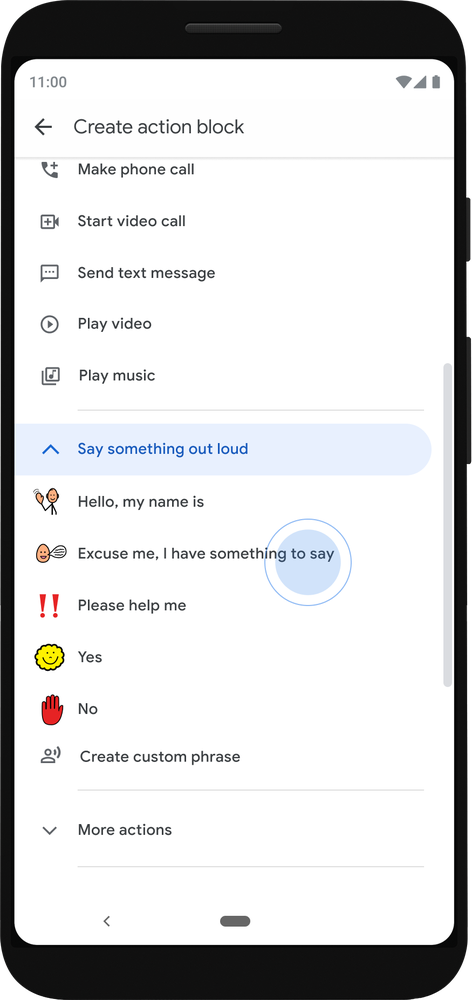
Caption: Action Blocks makes communication more accessible
Built for people with cognitive disabilities and age-related conditions, Action Blocks can now be used to communicate short phrases. It acts as an artificial voice for people with cerebral palsy, Down Syndrome, autism, aphasia, and other speech related disabilities. In addition, Action Blocks now incorporates thousands of Picture Communication Symbols from Tobii Dynavox, making it easier to use the Android app alongside existing speech therapy and special education materials. It also now supports Japanese, French, German, and Italian. Download Action Blocks on Google Play.
6. Enjoy the entertainment you love, with a little help from Google
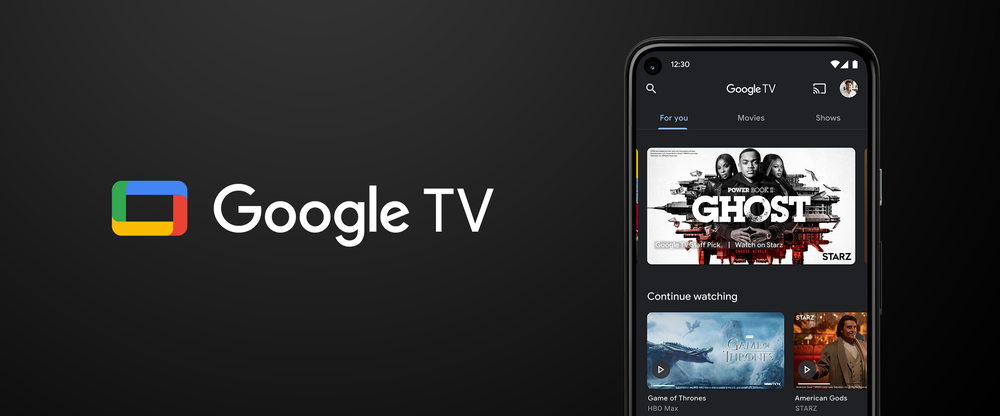
Click on the image above to see a video of the Google TV app on Android
Your TV isn't the only place for finding and watching entertainment. Starting on Android phones in the U.S., the Google Play Movies & TV app is being updated to Google TV. Google TV helps you discover what to watch with recommendations for movies and shows from across your streaming apps. And with the Google TV app, your recommendations, Library, and Watchlist go with you wherever you are, whether it’s out the front door or just to the other room. Learn more on Google Play.

via Android https://ift.tt/36M9c58
Doing more to design for and with people with disabilities
In 2013, I joined Google’s Central Accessibility Team. Since then, I've continuously worked to include people with disabilities across all of the work that we do at Google. October is National Disability Employment Awareness Month, a time to celebrate and recognize the contributions of people with disabilities. Today, we’re sharing a few ways we’re continuing to support hiring people with disabilities and how we design products for and with the one billion people in the world with disabilities.
Building a helpful workplace with new career resources
In the United States, only 19 percent of people with disabilities are employed—leaving employers with a largely untapped talent pool. We need to do more to encourage the employment of people with disabilities, and we want to support that change at Google. Through the years, we’ve evaluated and iterated on our own processes to help improve disability inclusion and awareness in the workplace. Doing so has helped us build a more diverse team of people with different backgrounds and experiences that is more representative of the people using our products.
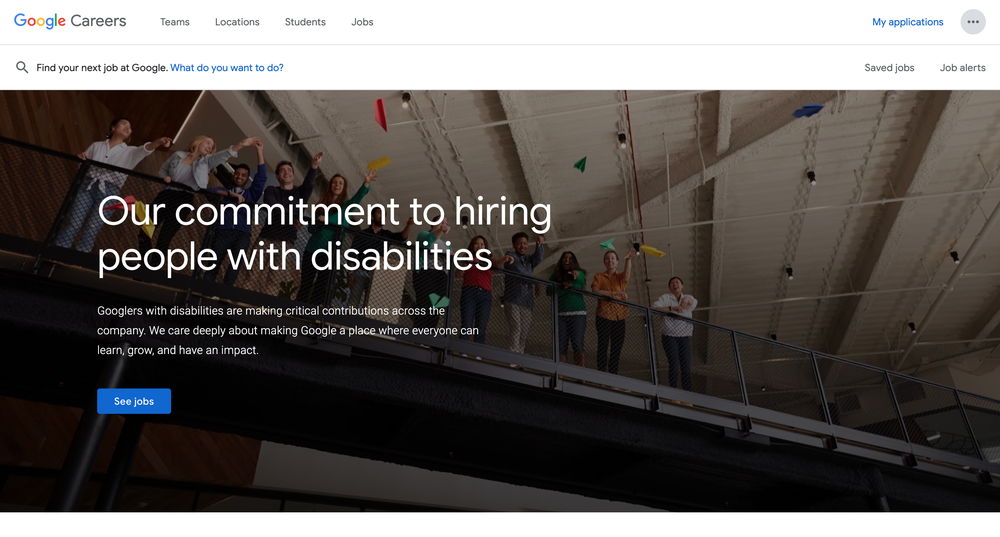
Visit the dedicated Google Careers resource page for people with disabilities to gain access to helpful resources.
We know that one of the first steps to finding a job at a new company is visiting their Careers website, but those resources may not be designed with people with disabilities in mind. This is why we've launched a dedicated Google Careers resource page that is specifically tailored toward what a job seeker with a disability might find helpful. Prospective candidates can find career resources and tips for applying, as well as read stories about Googlers with disabilities and our employee-led Google Disability Alliance community. The page also highlights the work we're doing to create products with and for people with disabilities.
Action Blocks makes communication more accessible
Earlier this year we launched Action Blocks, an Android app designed with people with cognitive disabilities in mind that allows you to create customizable home screen buttons to navigate your device. Today, we are beginning to roll out an update to Action Blocks that will help make communication more accessible for people who are non-verbal.
People who are non-verbal often use augmentative and alternative communication (AAC) to communicate with those around them. Updates to Action Blocks make it more familiar for anyone who uses an AAC device to communicate.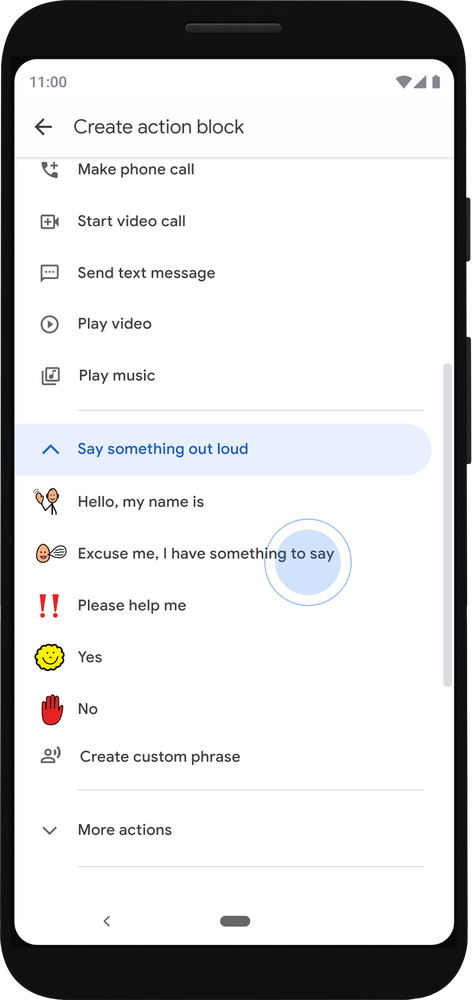
You can now create Action Blocks that speak common phrases.
You can now use a quick setup process to create Action Blocks that speak common phrases. For instance, you can set up your blocks to say, “yes,” “no,” or “Excuse me, I have something to say.”
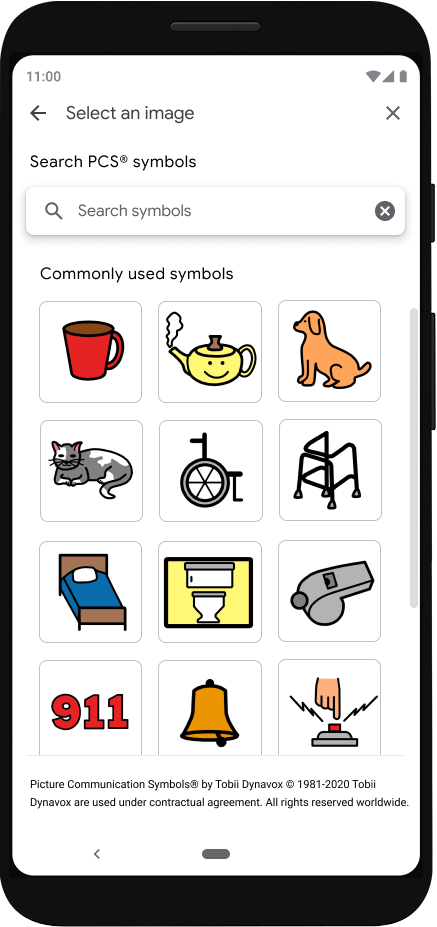
Use Tobii Dynavox’s library of Picture Communication Symbols to customize your Action Blocks.
Action Blocks also comes loaded with thousands of Picture Communication Symbols from Tobii Dynavox’s library, which is commonly used on other AAC devices to communicate efficiently using pictures and symbols assigned to blocks. Having a similar set of icons available makes using Action Blocks’ AAC features more familiar for people who use Tobii Dynavox technology.
Action Blocks works on Android phones without any additional hardware, making communication more convenient and accessible to people whether they are on the go, without their AAC devices, or don’t have access to an AAC device. And it’s now available to more people with expanded language options such as French, Italian, German, Spanish and Japanese.
In addition to AAC functionality, if you prefer to use physical adaptive switches—which can make it easier to navigate assistive technology—you can now assign a switch to an Action Block. This way, you can tap a physical button to easily trigger a Google Assistant action on your phone—such as making a call, watching a video or controlling a home device like a thermostat. To learn more about using Action Blocks, visit the help center.
We believe designing for and with people with disabilities means building better products all around. Today’s announcements are a few steps forward in the journey to make the world a more inclusive place for people with disabilities.

via Android https://ift.tt/3jEMRKn
More controls and transparency for your selfies
Since the dawn of the front-facing camera, and even before it, selfies have been a crucial way we express ourselves. So crucial, in fact, that more than 70 percent of photos taken on an Android device use the front-facing camera, and over 24 billion photos have been labeled as selfies in Google Photos. And of course, emojis, filters, stickers and captions have all become part of the fun, and help us show what we're feeling and thinking at any given moment.
Filters have rapidly increased in popularity over the past few years. Many of us love to play around with filters and try different ones on our photos—but sometimes, filters are turned on by default in our photo apps without our knowing.
We set out to better understand the effect filtered selfies might have on people’s wellbeing—especially when filters are on by default. We conducted multiple studies and spoke with child and mental health experts from around the world, and found that when you’re not aware that a camera or photo app has applied a filter, the photos can negatively impact mental wellbeing. These default filters can quietly set a beauty standard that some people compare themselves against.
Building guidelines on control, transparency and design language
To put our research into practice, we created a framework to build and design products that support your wellbeing as well as an intentional relationship with technology. These people-centered guidelines inform and respect your personal choices regarding face retouching and center around control, transparency and design language. This means you should get to choose if and when your appearance is changed in pictures.
These guidelines suggest that face retouching settings should be off by default so you choose when you want to turn them on. If face retouching filters are on, this should be clearly indicated in the product experience. And when it’s off, it should stay off. We’ve steered away from references to “beauty,” by using iconography and language that is value-neutral, so you can decide what retouching means to you.
Bringing these principles to life
With Google’s Pixel phones, we’ve begun to apply these design principles directly within the Camera app. Starting with the Pixel 4a, the new Pixel 4a (5G) and Pixel 5, face retouching options are available in the camera app, but turned off by default. In an upcoming update, you’ll see value-free, descriptive icons and labels for face retouching options. And if you choose to use face retouching effects, you’ll see more information about how each setting is applied and what changes it makes to your image.
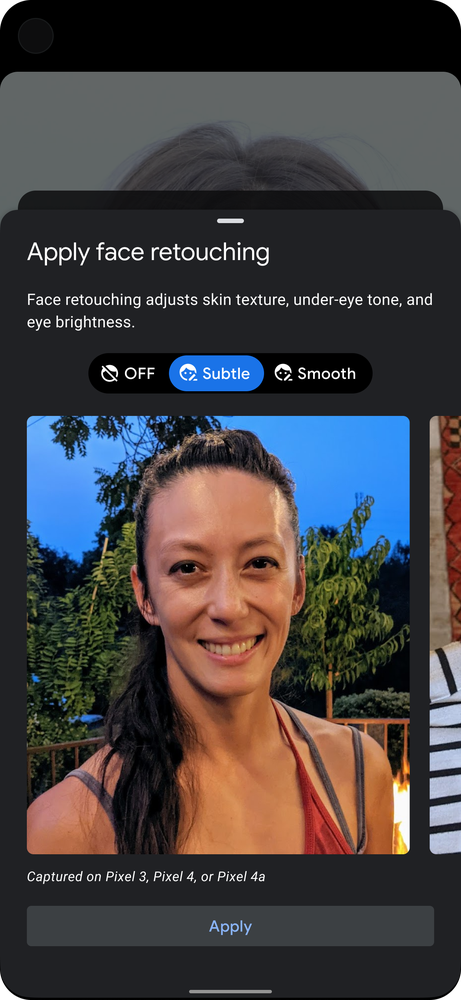
Meaningful change takes collective effort, across a broad ecosystem of apps and devices. Our partners have shared customer feedback that echoes what we heard in our research, and we’ve shared our insights and design framework with them as they continue to find ways to update their product experiences as well.
An app that shares our beliefs is Snapchat. Their default camera experience is always unfiltered, and you have the option to opt-in to lenses. Lens Studio also uses value-neutral terms for its facial retouching feature, and is committed to continuing to make improvements in this area.
These are the first of many steps we’re taking to support wellbeing and bring your voice into our design process.

via Android https://ift.tt/36kbwAd
Say goodbye to hold music
Sometimes, a phone call is the best way to get something done. We call retailers to locate missing packages, utilities to adjust our internet speeds, airlines to change our travel itineraries...the list goes on. But more often than not, we need to wait on hold during these calls—listening closely to hold music and repetitive messages—before we reach a customer support representative who can help. In fact, people in the United States spent over 10 million hours on hold with businesses last week.
Save time with Hold for Me
Hold for Me, our latest Phone app feature, helps you get that time back, starting with an early preview on Pixel 5 and Pixel 4a (5G) in the U.S. Now, when you call a toll-free number and a business puts you on hold, Google Assistant can wait on the line for you. You can go back to your day, and Google Assistant will notify you with sound, vibration and a prompt on your screen once someone is on the line and ready to talk. That means you’ll spend more time doing what’s important to you, and less time listening to hold music.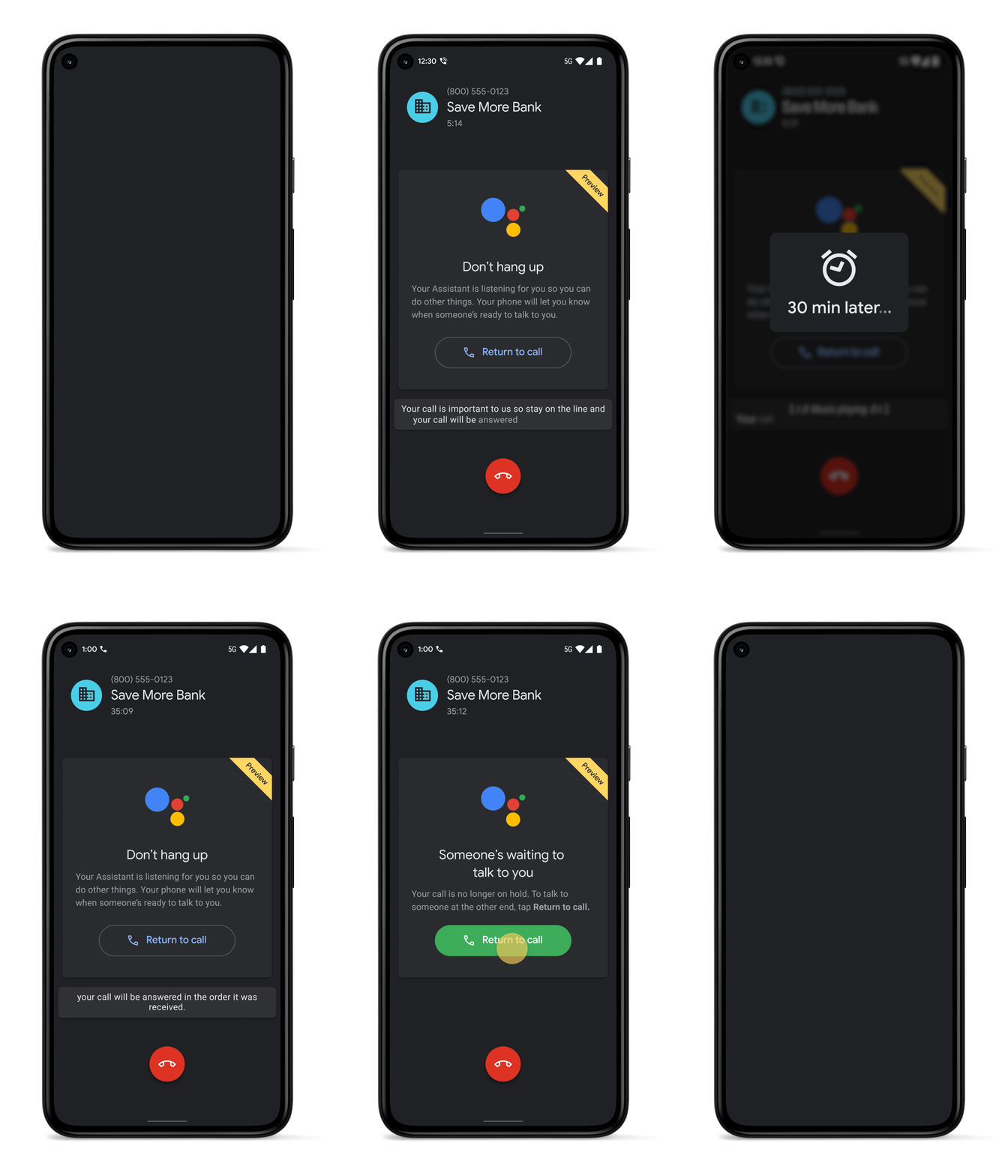
Tap “Hold for me” in Google’s Phone app after you’re placed on hold by a business.
Hold for Me is our latest effort to make phone calls better and save you time. Last year, we introduced an update to Call Screen that helps you avoid interruptions from spam calls once and for all, and last month, we launched Verified Calls to help you know why a business is calling before you answer. Hold for Me is now another way we’re making it simpler to say hello.
Powered by Google AI
Every business’s hold loop is different and simple algorithms can't accurately detect when a customer support representative comes onto the call. Hold for Me is powered by Google’s Duplex technology, which not only recognizes hold music but also understands the difference between a recorded message (like “Hello, thank you for waiting”) and a representative on the line. Once a representative is identified, Google Assistant will notify you that someone’s ready to talk and ask the representative to hold for a moment while you return to the call. We gathered feedback from a number of companies, including Dell and United, as well as from studies with customer support representatives, to help us design these interactions and make the feature as helpful as possible to the people on both sides of the call.
While Google Assistant waits on hold for you, Google’s natural language understanding also keeps you informed. Your call will be muted to let you focus on something else, but at any time, you can check real-time captions on your screen to know what’s happening on the call.
Keeping your data safe
Hold for Me is an optional feature you can enable in settings and choose to activate during each call to a toll-free number. To determine when a representative is on the line, audio is processed entirely on your device and does not require a Wi-Fi or data connection. This makes the experience fast and also protects your privacy—no audio from the call will be shared with Google or saved to your Google account unless you explicitly decide to share it and help improve the feature. When you return to the call after Google Assistant was on hold for you, audio stops being processed altogether.
We’re excited to bring an early preview of Hold for Me to our latest Pixel devices and continue making the experience better over time. Your feedback will help us bring the feature to more people over the coming months, so they too can say goodbye to hold music and say hello to more free time.

via Android https://ift.tt/30o8aIv
Android 11 (Go edition): New features coming to more devices
We first introduced Android (Go edition) in 2018 to provide a high-quality smartphone experience for entry-level device owners around the world. Since then, Android (Go edition) has brought improved speed, reliability, and security to over 100 million entry-level devices through apps and features specifically built to address local needs. Continuing on with that same mission, here’s a look at what’s new in Android 11 (Go edition).
Improving communication, privacy and usability
On Android 11 (Go edition) apps launch 20 percent faster than they did on Android 10 (Go edition), making it easier for you to switch between apps without your phone getting bogged down.
Around the world people use different messaging apps to stay in touch, so they often find themselves toggling between them to chat with family and friends. Now Android 11 (Go edition) shows all of your conversations in a dedicated space in the notification section. This means you can see, respond to, and manage your conversations with family and friends all in one place, no matter what apps they use.
Affordability shouldn’t mean compromising privacy and security, which is why we’ve ensured that Go edition smartphones have access to the same industry-leading privacy protections as any Android device. Android 11 (Go edition) comes with new privacy enhancements that make it easier to control how and when data on your device is shared. With one-time permissions, you can grant an app access to specific sensors like your microphone, camera or location, just in that instance. And if you haven’t used an app for an extended period of time, app permissions will “auto-reset” and you will immediately receive a notification of the change. You can always choose to re-grant the app permissions the next time you open the app.
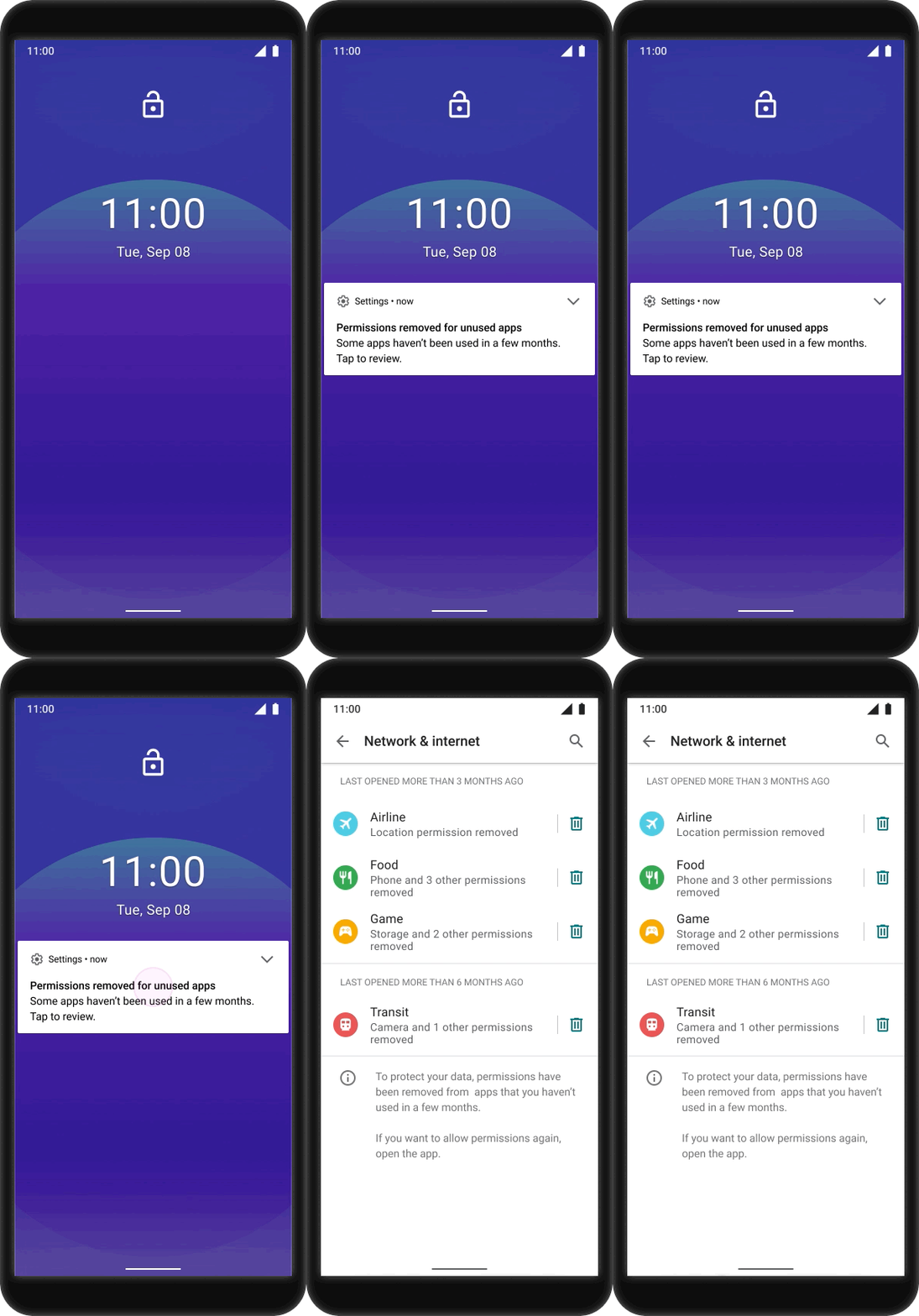
Grant individual apps one-time permissions to access sensors like your microphone, camera or location.
As devices with larger screen displays become more common, Android 11 (Go edition) helps you take advantage of the increased screen real estate for your favorite apps. With gesture-based navigation you can go to the home screen, navigate backward, and fluidly switch between apps using simple swipes.
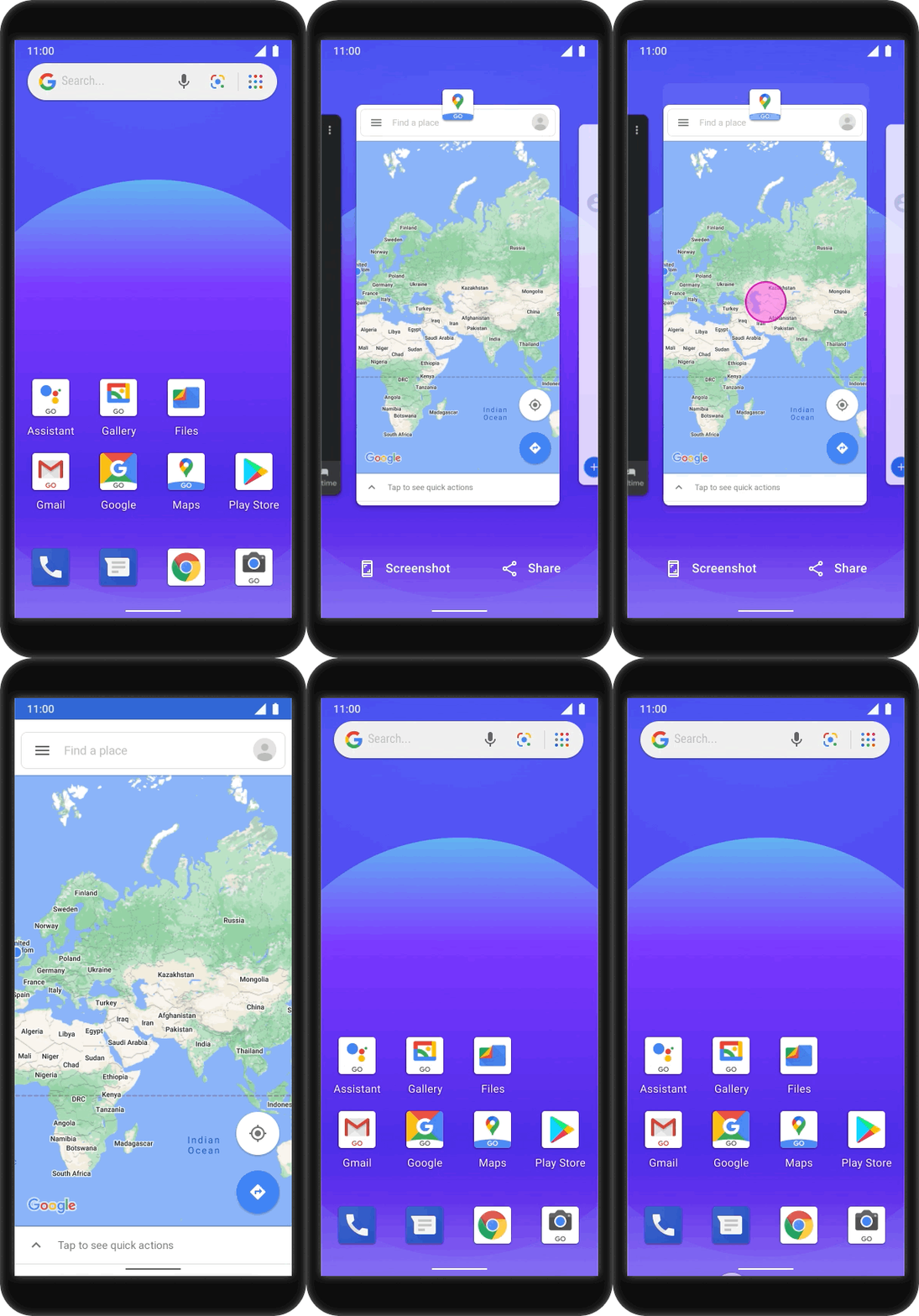
Switch between apps using simple swipes with gesture navigation
New app features
This year, we’ve also introduced improvements to our suite of apps that were specially designed for entry-level smartphones. For example, Safe Folder is a new feature in Files by Google that protects personal files from being opened or accessed by others by storing them in a 4-digit PIN-encrypted folder.

Browse files safely and securely with PIN-encrypted Safe Folder
More memory, more devices, more options
In the past two years, smartphone manufacturers have produced high-quality Android devices—with features like dual cameras or fingerprint scanners—at more affordable prices. As more of these memory-intensive features come to entry-level smartphones, our partners have asked us to improve performance on these devices, particularly around speed, storage, and memory. So, starting next month Android (Go edition) will be available on all devices with up to 2GB of memory.
With the expansion to 2GB, apps launch up to 20 percent faster, and with an additional 270 MB of additional free memory, people can now run three to four more apps in the background. Android (Go edition) on 2GB devices also comes with up to 900MB of additional free storage space—enough to take up to 300 more selfies and download an entire movie.
Learn more at android.com/go

via Android https://ift.tt/3hp3sjC
Android 11's Pixel-first features are here
A few times a year, your Pixel receives a boost with software updates that send new features, tricks, and apps to your phone. And this time, with new Pixel-first features on Android 11, your Pixel has even more smarts to make it better and more helpful—like giving you new ways to control your media and organize your apps, and making it easier to communicate with friends and family. And it all comes with privacy as a priority. Everything happens over the air, so you get that new-phone feeling over and over again.
Prioritize people, with Pixel
Beginning today, new Android 11 features are hitting Pixel first to help you focus on connecting with those close to you, whether you’re meeting in a park for a socially distant picnic, or quickly responding to your loved ones’ texts.
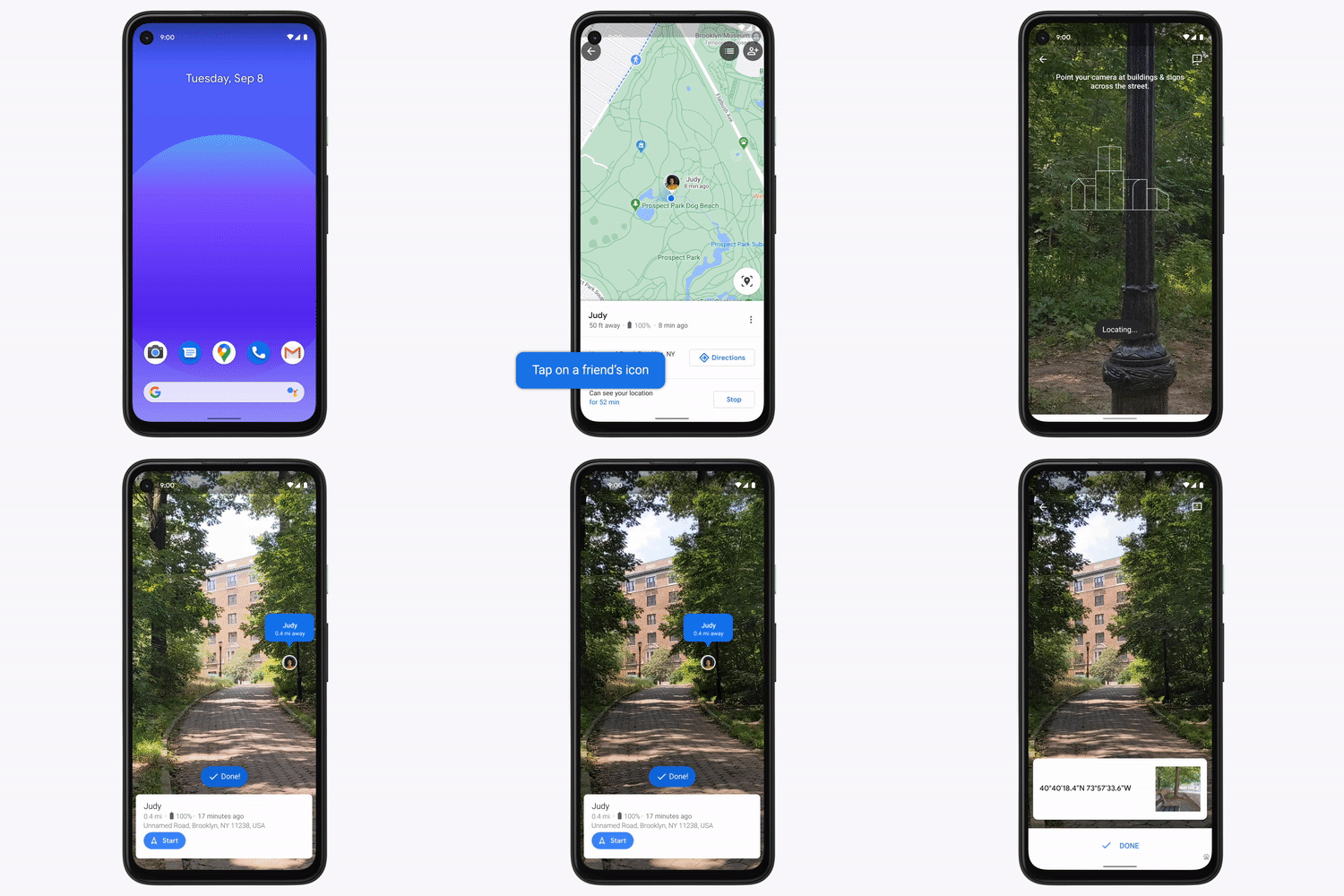
You can now use Live View with Location Sharing in Google Maps to easily meet up with friends IRL. If your friends have chosen to share their location with you, simply tap on their icon and then on Live View on the right side of your screen. You’ll see where they are in relation to you, along with how far away they are. Tapping on start will then show you arrows and directions placed right on top of your world so you can see exactly which way to go.
The new Smart Reply on your Pixel’s keyboard makes typing effortless by giving you helpful suggestions when you’re using chat apps. And it’s all processed on your phone to protect your privacy. (Right now this is available in English only and requires use of Gboard. It’s not available for all chat apps.)
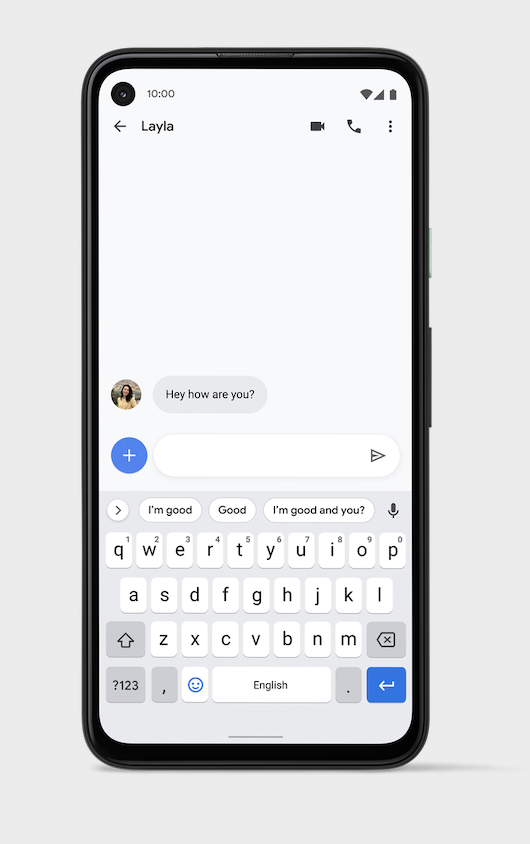
Get more control over your phone
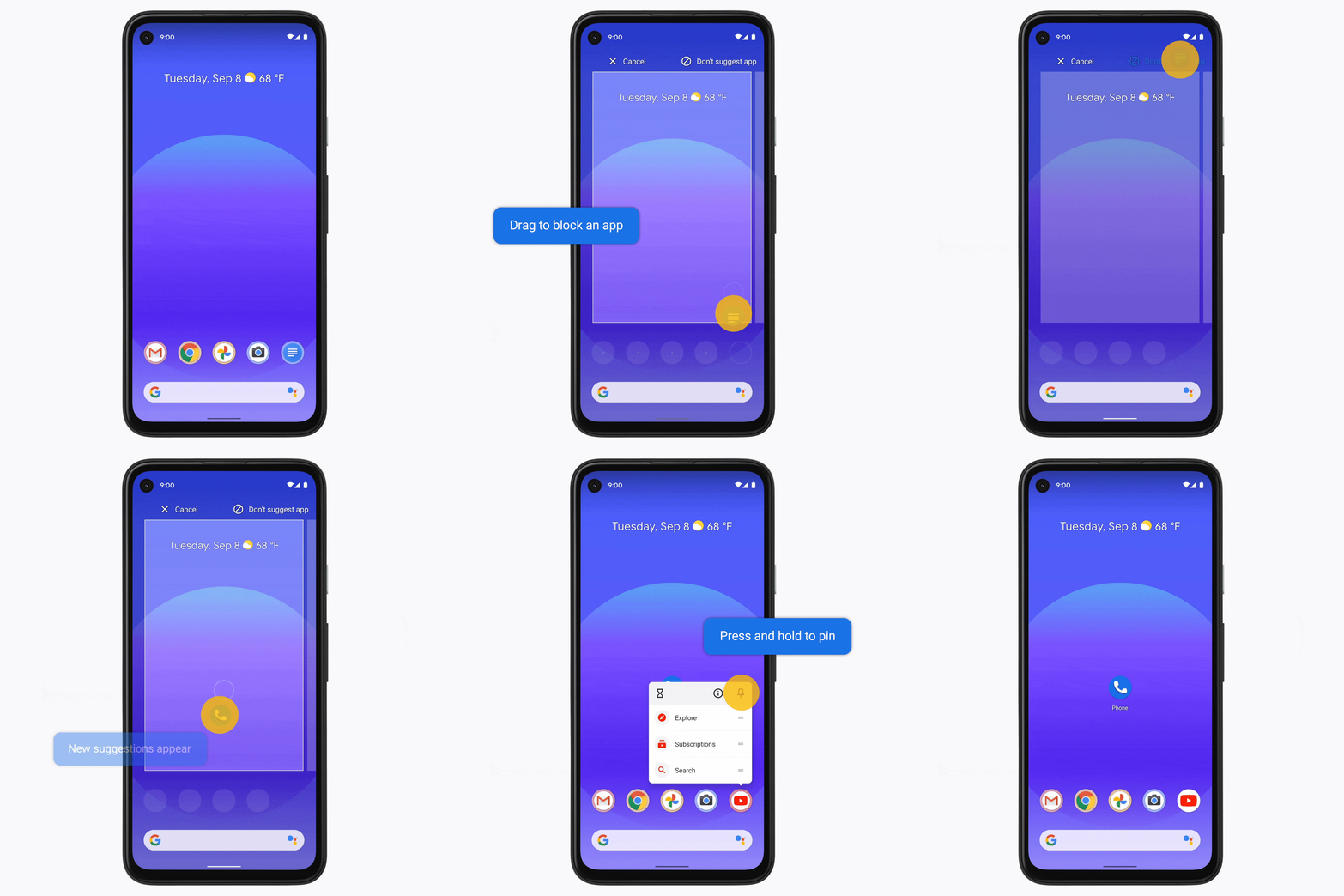
Now your Pixel can make app suggestions based on your daily routines so you can quickly get to tools you need, when you need them. Your phone will recommend apps you use at different times of the day, like Messages for your daily check-ins, Google Maps for your afternoon stroll or the media apps you use in the evening to help you wind down from a busy day.
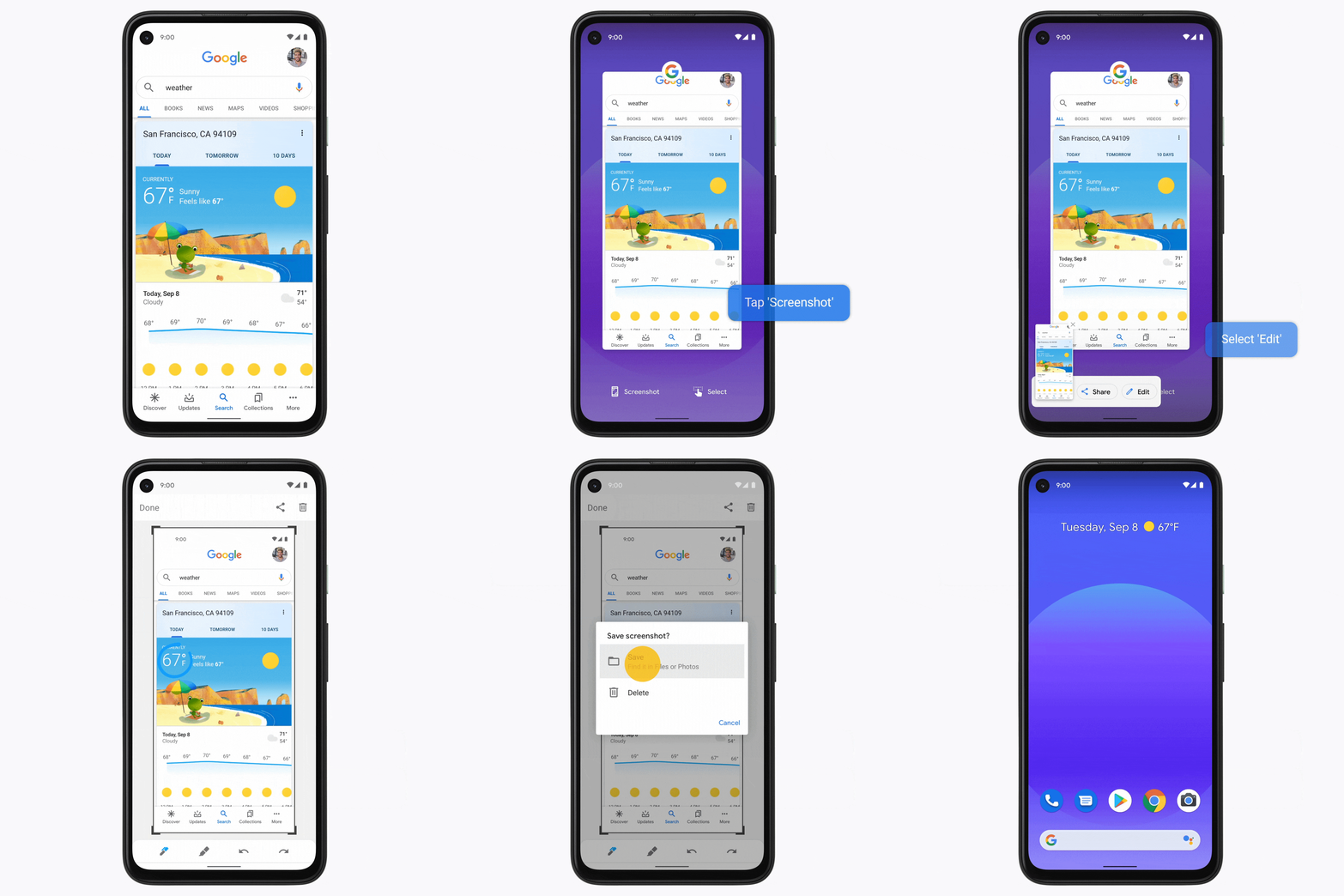
Your Pixel will also give you more convenient ways to select text and images, or take a screenshot with new overview actions. So whether you’re copying and pasting, saving or sharing the content you want, you’ll have more options over how you select and engage with content on your Pixel.
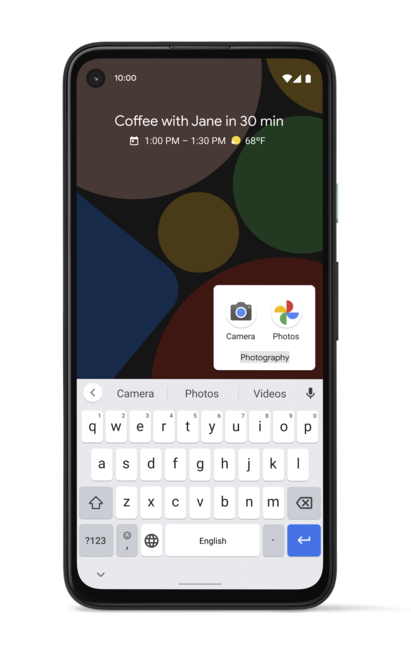
Make your Pixel as unique as you are, starting with your home screen. Now, your Pixel can help organize your phone with new intelligent suggestions for folder names. Quickly group apps by theme, like Photography, News, Navigation, Fitness and more.
Pixel x Android 11
In addition to everything coming to Pixel first, you’ll also get all of the great new Android 11 features as well, giving you easier ways to manage your conversations, connected devices, privacy and beyond.
Android 11 begins rolling out to Pixel devices today; learn more about all of the Android 11 updates here.

via Android https://ift.tt/2F2tJal
Turning it up to Android 11
Android 11 has arrived! The latest release is all about helping you get to what's important on your phone with easier ways to help you manage your conversations, connected devices, privacy, and much more. In honor of the 11th version of Android, here are 11 new things that are coming in Android 11:
Better ways to communicate with the people in your life
1. I often find myself switching between multiple messaging apps to stay connected with people I care about. In Android 11, conversations across messaging apps will be moved to a dedicated space in the notifications section, making it easy to manage your conversations in one spot. You can also prioritize conversations from the key people in your life so you never miss an important message.
2. Bubbles makes multitasking on your device a breeze. You can now respond to important conversations without having to switch back and forth between what you’re doing and your messaging app.
3. Built-in screen recording is finally here: Now you can capture and share what’s happening on your phone. Record with sound from your mic, device or both—no extra app required.
New ways to control your connected devices & media
4. You can now access all your smart devices in one place, simply by long pressing the power button. Control your connected devices like your thermostat or smart lock with a tap, so there’s no need to open multiple apps.
5. Media controls have been redesigned and are more helpful than ever. You can now quickly switch the device your media is playing on, so you can take your music with you from your headphones to your speaker without missing a beat.
6. Android Auto now works wirelessly for all phones running Android 11 as long as you have a compatible vehicle. So you can bring the best of your phone on every drive while skipping the cable—get directions with a tap, talk to send a text, play your favorite media and get help from Google Assistant.
More control over your privacy and data
7. One-time permissions will allow you to grant single use access to your most sensitive permissions: microphone, camera and location. The next time the app needs access to the sensors, it must ask you for your permission again.
8. If you haven’t used an app that you installed on your device in a while, you may not want it to keep accessing your data. Android will now “auto-reset” permissions for your unused apps and notify you accordingly. You can always decide to re-grant the app permissions the next time you use the app.
9. With additional Google Play system update modules, even more security and privacy fixes can be sent to your phone from Google Play, in the same way your apps update. So you’ll get these fixes as soon as they’re available, without having to wait for a full OS update.
10. For Android Enterprise users, Android 11 brings the privacy protections you get on a personally-owned device to your company-owned device. The work profile gives your IT department tools to manage a device without monitoring your personal profile data or activity on your phone.
Even more on Pixel
11. If you're using a Pixel 2 or above you'll get additional features to organize and manage your phone, like app suggestions on the home screen based on your daily routines, and new overview actions that allow you to take a screenshot of an app and select text and images, and more.
Android 11 will begin rolling out today on select Pixel, OnePlus, Xiaomi, OPPO and realme phones, with more partners launching and upgrading devices over the coming months. Learn more at android.com/android-11.

via Android https://ift.tt/35jhd0O
Say hello to safer phone calls
Businesses often rely on phone calls to reach out to new customers and serve existing ones. But here’s the hang-up: customers often don’t answer the call if they don’t recognize the number. They worry it could be spam, or worse, a scam: a 2019 FTC report found that phone calls were the number one way people reported being contacted by scammers. While most people said they hung up on those calls, those who lost money reported a median loss of $1,000. Spam and scam calls erode trust in businesses and increase costs to consumers.
Verified Calls by Google
Verified Calls aims to solve this problem by showing the caller’s name, logo, reason for calling and a verification symbol indicating the business has been authenticated by Google. This is done in a secure way—Google doesn’t collect or store any personally identifiable information after verification.
Verified Calls is a feature on Google’s Phone app, which comes pre-loaded on many Android phones and will be available for download starting later this week on even more Android devices.
Better answer rates
We’ve been piloting Verified Calls for a few months, and the early results indicate that it improves the likelihood of someone answering a call. This in turn helps reduce business costs while identifying relevant calls to people in a trustworthy way. A wide range of businesses and institutions have been using Verified Calls during the pilot. For instance, banks calling to alert a customer about a possible fraudulent transaction can increase answer rates by stating the call reason. A food delivery or logistics company can do the same to make sure customers are available to receive their deliveries.
Verification increases consumer trust
Based on last year’s launch of Verified SMS, which confirms the identity of the business that’s texting you, we learned that verified communication is valuable to both businesses and consumers. A study in the U.S. and Brazil found that Verified SMS increased consumer trust in brands, which significantly improved performance on metrics like likelihood to purchase, brand satisfaction, and likelihood to recommend.
Getting started
Verified Calls is initially rolling out in the U.S., Mexico, Brazil, Spain and India, with more countries to come. Brand and channel partners can get more information on our website. We also have existing partners—including Neustar, Five9, Vonage, Aspect, Bandwidth, Prestus, Telecall, and JustCall—ready to help brands improve their answer rates by using Verified Calls. To understand how Verified Calls works, tune in to our special session at Google Cloud Next ‘20 On Air.
via Android https://ift.tt/3bFy7ri
Explore Kids Space: A way to nurture your kid's curiosity
Parents have told us that they’re constantly wrestling with the role of technology in their children’s lives, and this is especially true for the many families who are spending more time at home. But kids are natural explorers and when they have access to great content, it can be a magical experience--they can read up on their favorite dinosaur, watch videos on how to bake a treat or discover new hobbies.
Family Link was created and built into our core products to give parents the tools they need to stay involved and help manage their child’s online experiences, from setting screen time limits to content safety filters, privacy controls and more. But we’ve heard that parents want more than just parental controls; with so much content out there, they also need help finding things that are enriching and engaging for their kids. To help meet this request, we took a first step with the launch of a new kids tab in Google Play that helps parents easily find and pick “teacher-approved” apps for their kids.
Today, we’re continuing to build upon these efforts with Google Kids Space, a new kids mode on select Android tablets that features apps, books and videos for your kids to explore, learn and have fun.* Kids Space will be available globally on certain Lenovo™ tablets first, including the new Lenovo Smart Tab M10 HD Gen 2, and will be coming to more Android tablets soon.†
Designed for nurturing your kid’s curiosity and creativity
Kids Space is designed with your kid at the center of the experience and made for them to become explorers of the things they love. By selecting their interests, your kids will see new and engaging content to read, play and make. Kids can even customize their experience by creating their own character.
Recommended library of free books, apps and videos
To evaluate and select “teacher-approved” apps in Google Play, we worked with academic experts and children’s education specialists to define rubrics. For Kids Space, we’ve built on that foundation and applied our quality standard to an ever-expanding library of apps and books in the Play and Read tabs. We worked with top publishers to make popular children’s books free of charge, and have over 400 free books available in the U.S. alone. In the Watch and Make tabs, your kids can view creative and fun videos from YouTube Kids that are engaging and encourage off-screen activities. And if you’re looking to customize even more, parents can download additional content from Google Play.
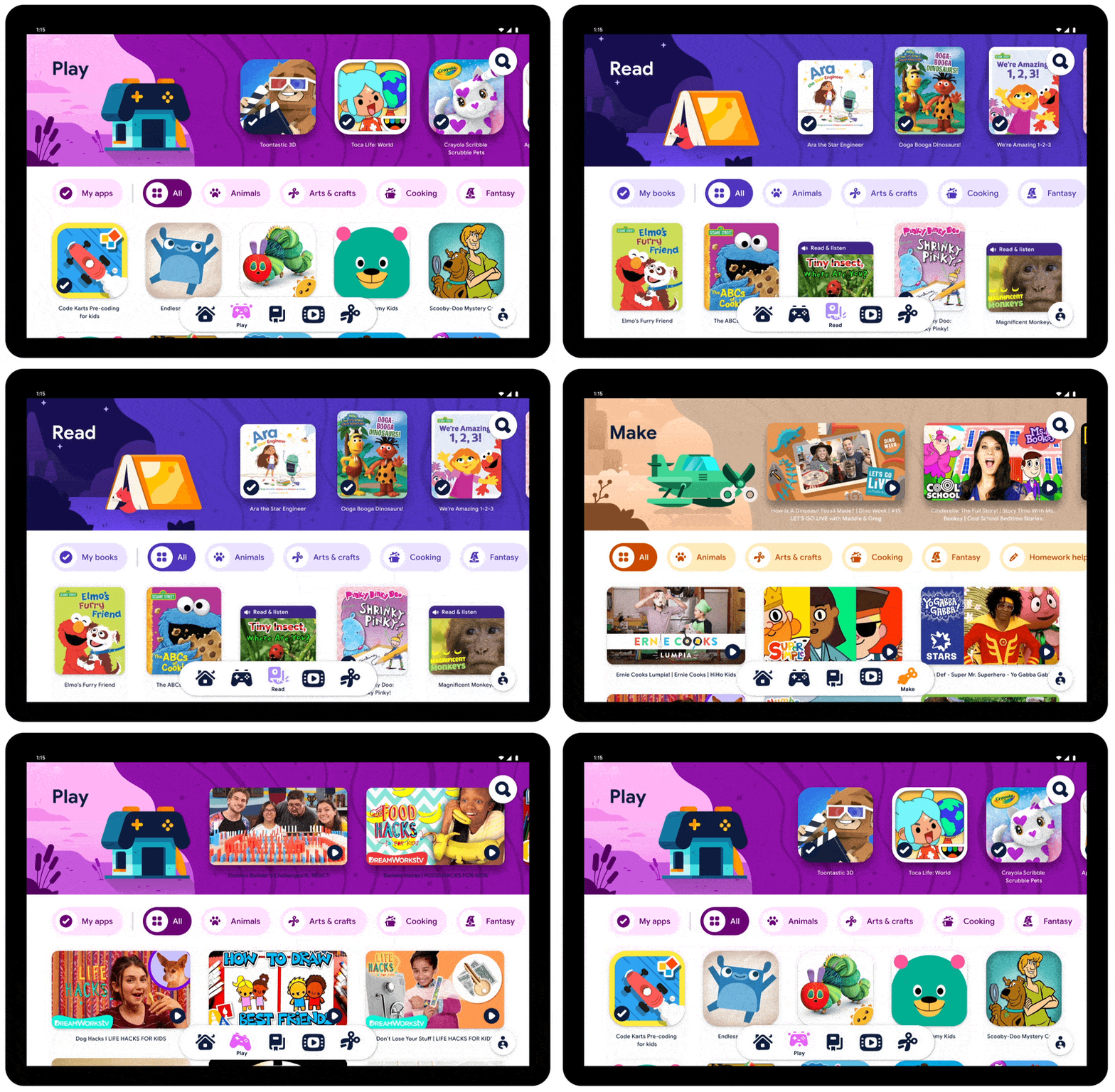
Access content that’s age-appropriate, thoughtfully designed and fun or inspiring.
Join us in our journey as we continue to create productive and healthy experiences for kids that adapt to the evolving world and needs of your family.
* Kids Space requires a Google Account for your child. Parental controls require the Family Link app on a supported Android, Chromebook, or iOS device. Books and video content not available in all regions. Video content subject to availability of YouTube Kids app. Books content requires the Play Books app. Availability of apps, books and video content may change without notice.
† Google Assistant not available in Kids Space.

via Android https://ift.tt/3lwzgGl
Earthquake detection and early alerts, now on your Android phone
Earthquakes happen daily around the world, with hundreds of millions of people living in earthquake prone regions. An early warning can help people prepare for shaking, but the public infrastructure to detect and alert everyone about an earthquake is costly to build and deploy. We saw an opportunity to use Android to provide people with timely, helpful earthquake information when they search, as well as a few seconds warning to get themselves and their loved ones to safety if needed.
Sending earthquake alerts to Android devices in California
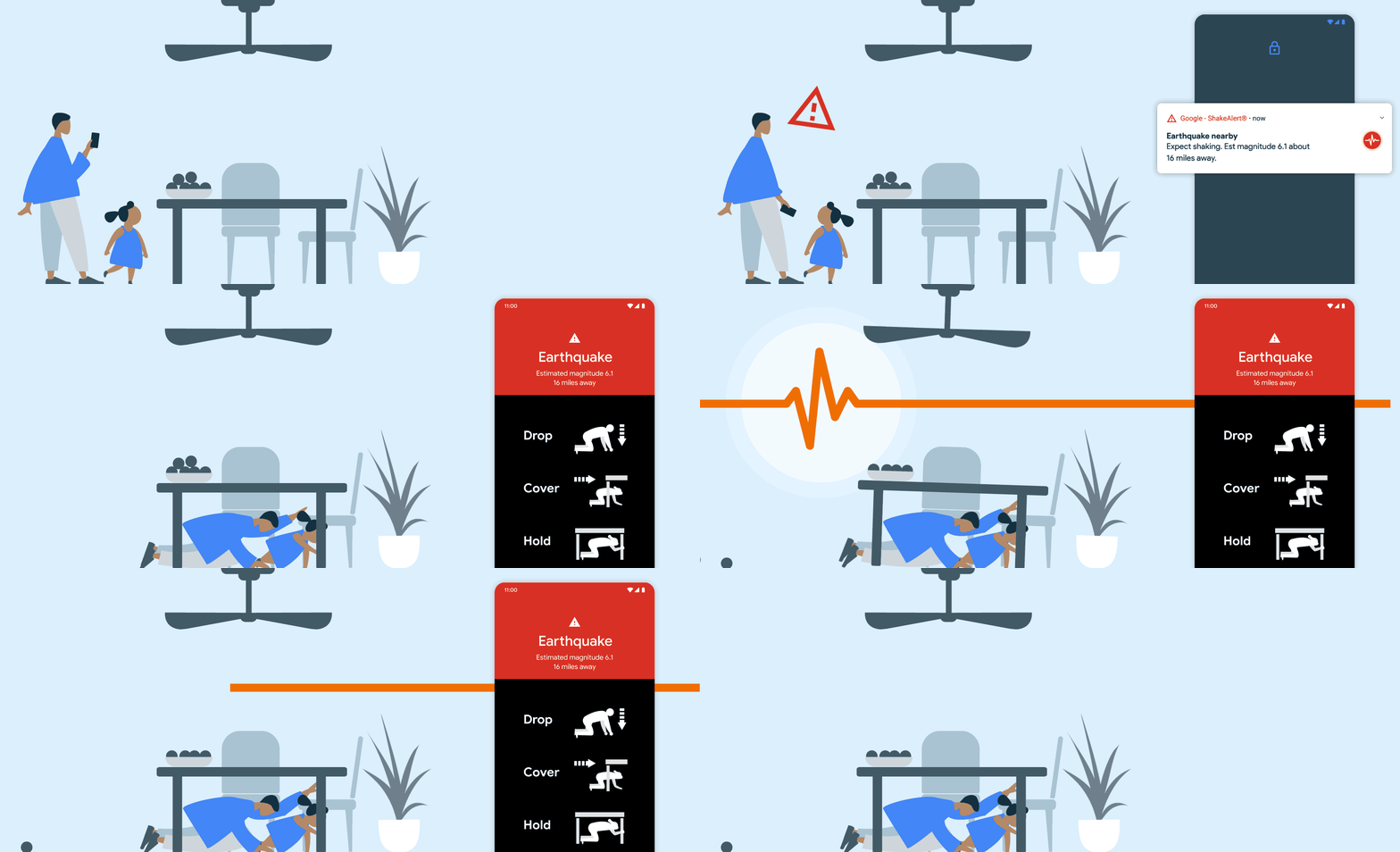
First, we collaborated with the United States Geological Survey (USGS) and California Governor's Office of Emergency Services (Cal OES) to send earthquake alerts, powered by ShakeAlert®, directly to Android devices in California.
Developed by the nation’s leading seismologists, the ShakeAlert system uses signals from more than 700 seismometers installed across the state by USGS, Cal OES, University of California Berkeley, and the California Institute of Technology. A few seconds of warning can make a difference in giving you time to drop, cover, and hold on before the shaking arrives.
Building the world’s largest earthquake detection network
Installing a ground network of seismometers, as California has done, may not be feasible in all impacted areas around the world. So we’re using the reach of Android’s platform to help detect earthquakes.
Starting today, your Android phone can be part of the Android Earthquake Alerts System, wherever you live in the world. This means your Android phone can be a mini seismometer, joining millions of other Android phones out there to form the world’s largest earthquake detection network.
All smartphones come with tiny accelerometers that can sense signals that indicate an earthquake might be happening. If the phone detects something that it thinks may be an earthquake, it sends a signal to our earthquake detection server, along with a coarse location of where the shaking occurred. The server then combines information from many phones to figure out if an earthquake is happening. We’re essentially racing the speed of light (which is roughly the speed at which signals from a phone travel) against the speed of an earthquake. And lucky for us, the speed of light is much faster!
To start, we’ll use this technology to share a fast, accurate view of the impacted area on Google Search. When you look up “earthquake” or “earthquake near me,” you’ll find relevant results for your area, along with helpful resources on what to do after an earthquake.

We’ve worked with globally-renowned seismology and disaster experts Dr. Richard Allen, Dr. Qingkai Kong and Dr. Lucy Jones to develop this crowdsourced approach for detecting earthquakes all around the world.
You might be wondering, “what’s next?” We’re starting with earthquake alerts in California since there’s already a great seismometer-based system in place. Over the coming year, you can expect to see the earthquake alerts coming to more states and countries using Android’s phone-based earthquake detection.

via Android https://ift.tt/3kABEvm
Use Lookout to take care of daily tasks faster
Everyone has a routine to their day, from pulling out ingredients to cook a meal, sorting through their mail, or perusing through documents. To help people who are blind or low-vision complete these daily tasks faster and more easily, we’re introducing updates to Lookout on Android: new modes, a more accessible design, and expansion to even more Android devices.
Lookout now has two new modes: Food Label and Scan Document. With Food Label, you can quickly identify packaged foods by pointing your phone’s camera at the label. Lookout will guide you to position the food product so that it can be properly identified through its packaging or barcode. This can be particularly helpful if you’re putting away groceries and want to make sure you’re handling the right items that might feel the same to your touch. For example, Food Label would be able to distinguish between a can of corn and a can of green beans.
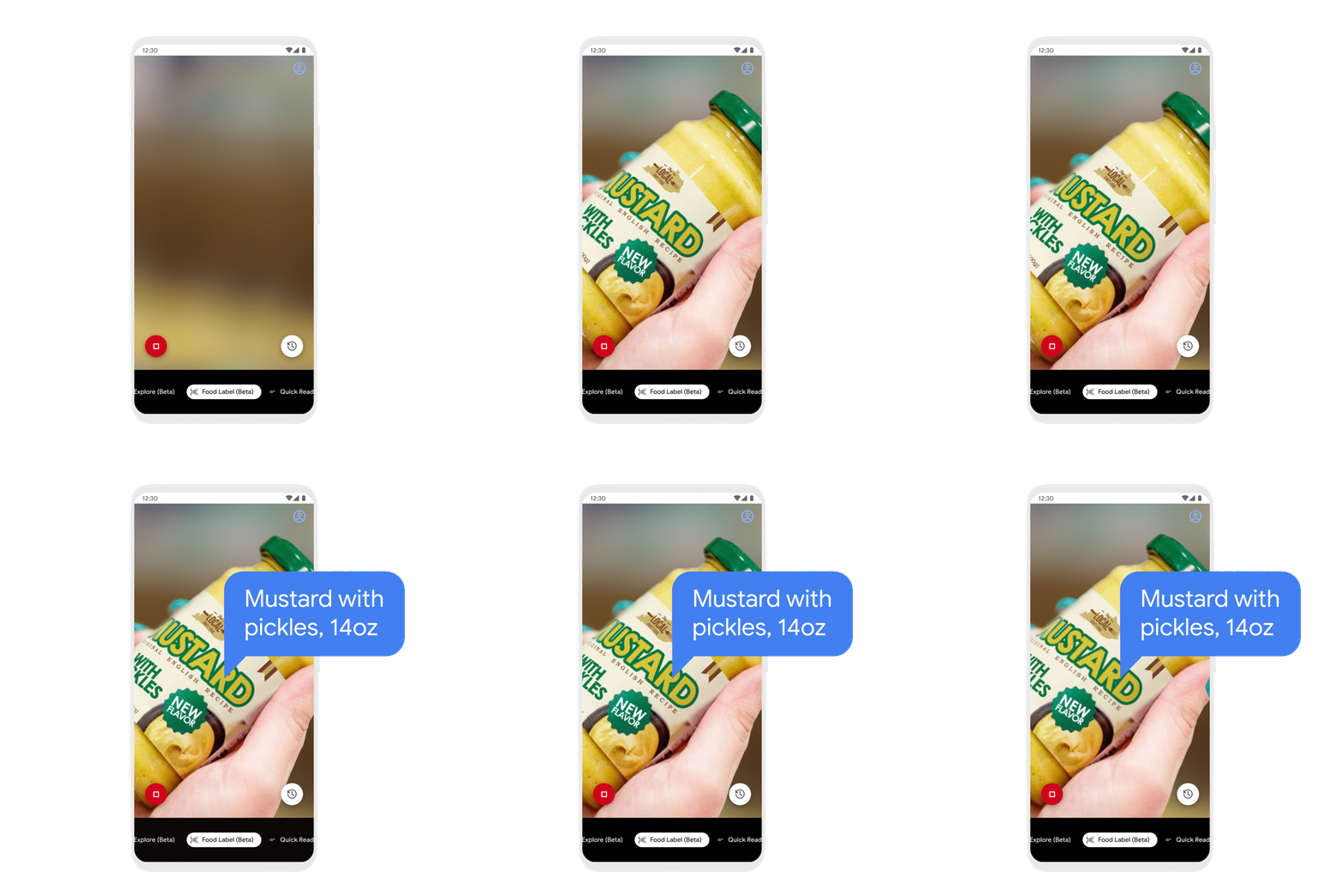
Use Food Label to identify different food products.
Scan Document makes it easier to go through letters and mail. Use Lookout to take a snapshot of a document, and it will capture the entire document’s content in detail so that it can be read aloud by your screen reader.
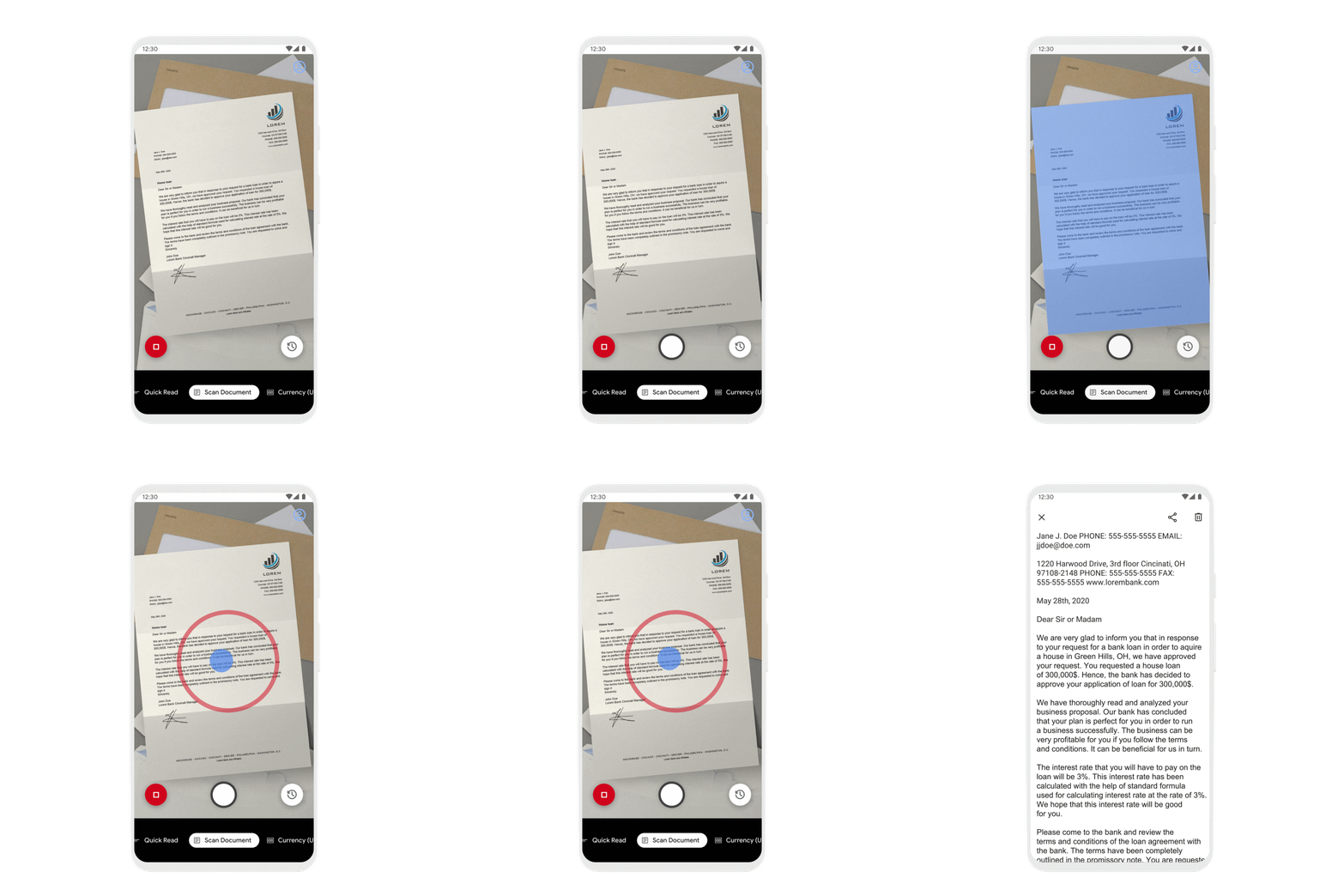
Use Scan Document to read long-form documents.
Based on feedback from the blind and low-vision community, we’re introducing an accessible design that is even more compatible with TalkBack, our Android screen reader. This includes making more space for the camera view, which makes it easier to frame the object you want more information about. In addition, we’ve changed navigation between modes to require fewer taps and less time by making it possible to scroll between them at the bottom of the screen.
With this update, Lookout will be available on all devices with more than 2GB of RAM running Android 6.0 and later. Lookout also now works in French, Italian, German and Spanish. Expanding this app to more people and devices is part of our commitment to make the world's information universally accessible and to build helpful products with and for people with disabilities.
Download Lookout today on Google Play.

via Android https://ift.tt/3ar7lTj
5 new things your Android phone can do
Your Android phone should get better and more helpful over time, even while you wait for the latest OS update to arrive. Like the recently announced Nearby Share that supports devices going back to Android 6.0, we’re building new features that improve the experience of billions of devices around the world. Today, we’re introducing five new features to your Android phone for added safety, restful sleep and more.
1. Save precious seconds during an emergency
Your Android phone can’t put out a fire, but it can provide help sooner with Android Emergency Location Service (ELS) now available to over 800 million people across 29 countries. Since launching ELS in 2016, we’ve worked with local public safety officials to shorten emergency response times around the world by improving access to accurate location information.
Now, your Android phone can share your device language setting when you dial your local emergency number wherever ELS is available. So if you don’t speak the local language, emergency operators can get the appropriate translator sooner and send you the help you need.
Android ELS is available on devices running Android 4.1 and above with Google Play Services installed.
2. Get alerted to earthquakes around you
Android phones around the world can now detect earthquakes with the Android Earthquake Alerts System, creating the world’s largest earthquake detection network. To start, this will lead to faster, more accurate earthquake information when you look up “earthquake near me” on Google Search.
The Android Earthquake Alerts System will be available on devices running Android 5.0 and above. And if you are in California, you will now receive earthquake alerts powered by ShakeAlert® directly on your Android phone.
3. Get more done in the car
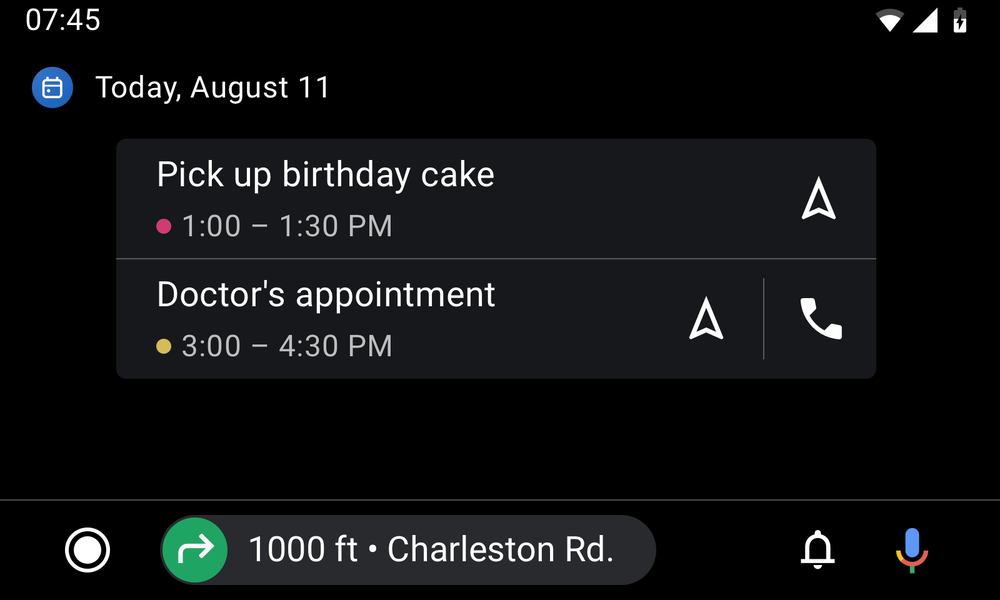
When driving, your safety is dependent on keeping your hands on the wheel and eyes on the road. With new updates to Android Auto, you can stay on top of your day without having to glance at your phone.
Get a quick look into your daily schedule on your car display with the new calendar app. With a few taps from a calendar event, get directions to the bakery where you ordered that birthday cake or make a quick phone call to tell them you'll be arriving soon.
And with the new settings app, you can manage your Android Auto preferences directly on your car display.
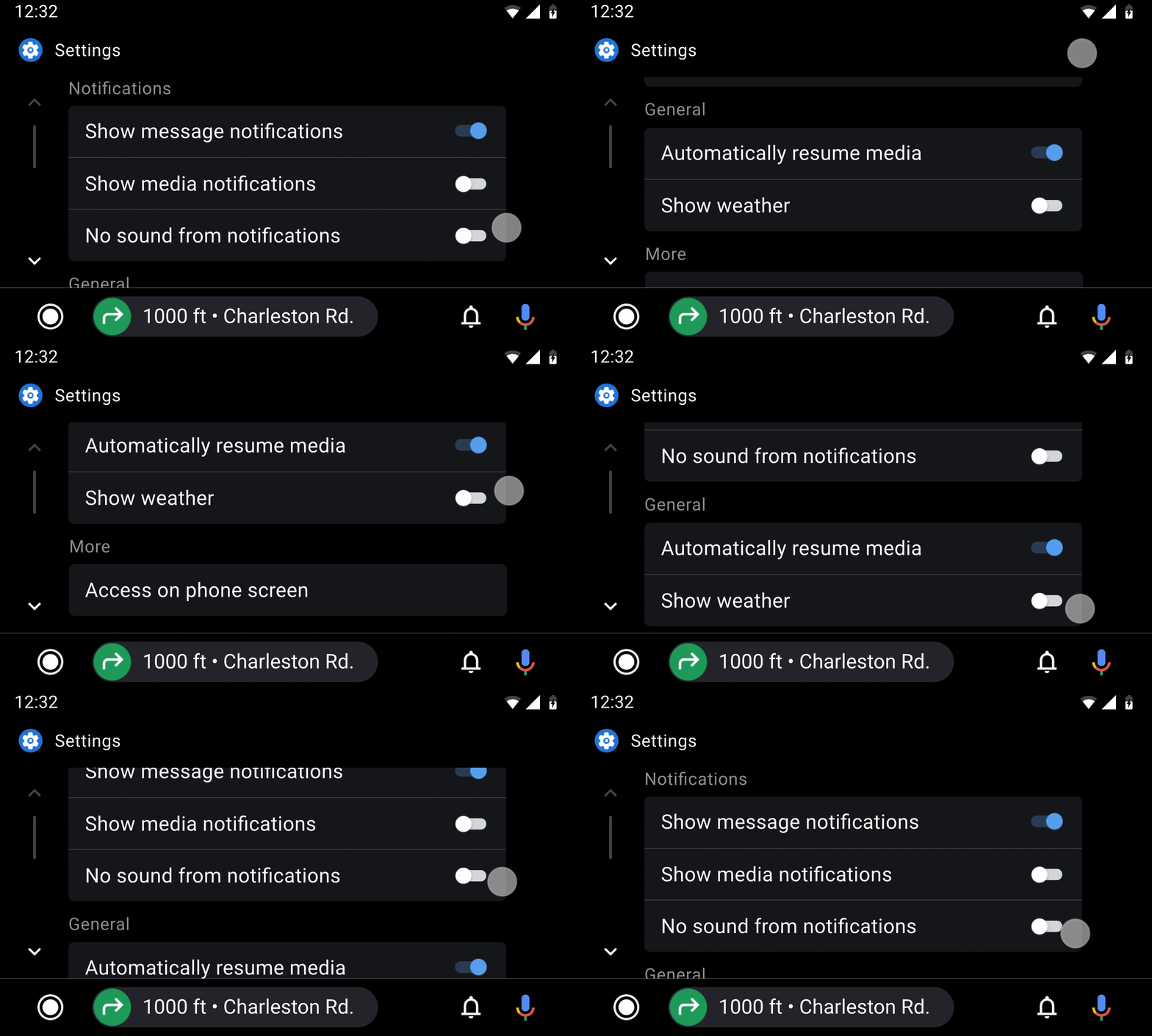
4. Rest easy, without interruptions
Remember that time when checking one notification turned into staying up an hour past your bedtime? We bet you weren’t too happy. So we created Bedtime mode to remind you when it’s time for bed and limit interruptions by keeping your phone dark and quiet while you sleep.
Now with the addition of the Bedtime tab in Clock, you can maintain a consistent sleep schedule, track your screen time at night, and fall asleep to soothing sounds from Calm, Spotify, YouTube Music and more. And if you dread feeling startled by your alarm, you can wake up more gently with visual cues from the Sunrise Alarm and your favorite sounds or song.
The Bedtime tab in the Clock app is now available for devices running Android 6.0 and above. For devices with Digital Wellbeing installed, turn on Bedtime mode in your settings or schedule it directly from the Clock app.
5. Lookout makes the physical world more accessible
We’re bringing new features to Lookout, an app that uses computer vision to help people who are blind or low-vision get things done faster and more easily. Built with and for the blind and low-vision community, this update debuts two new modes and a more accessible design. Now Lookout can scan long form documents into readable text, identify products from their food labels, and is even more compatible with screen readers. It also includes expansion to new languages and phones, automatic flash, and more.
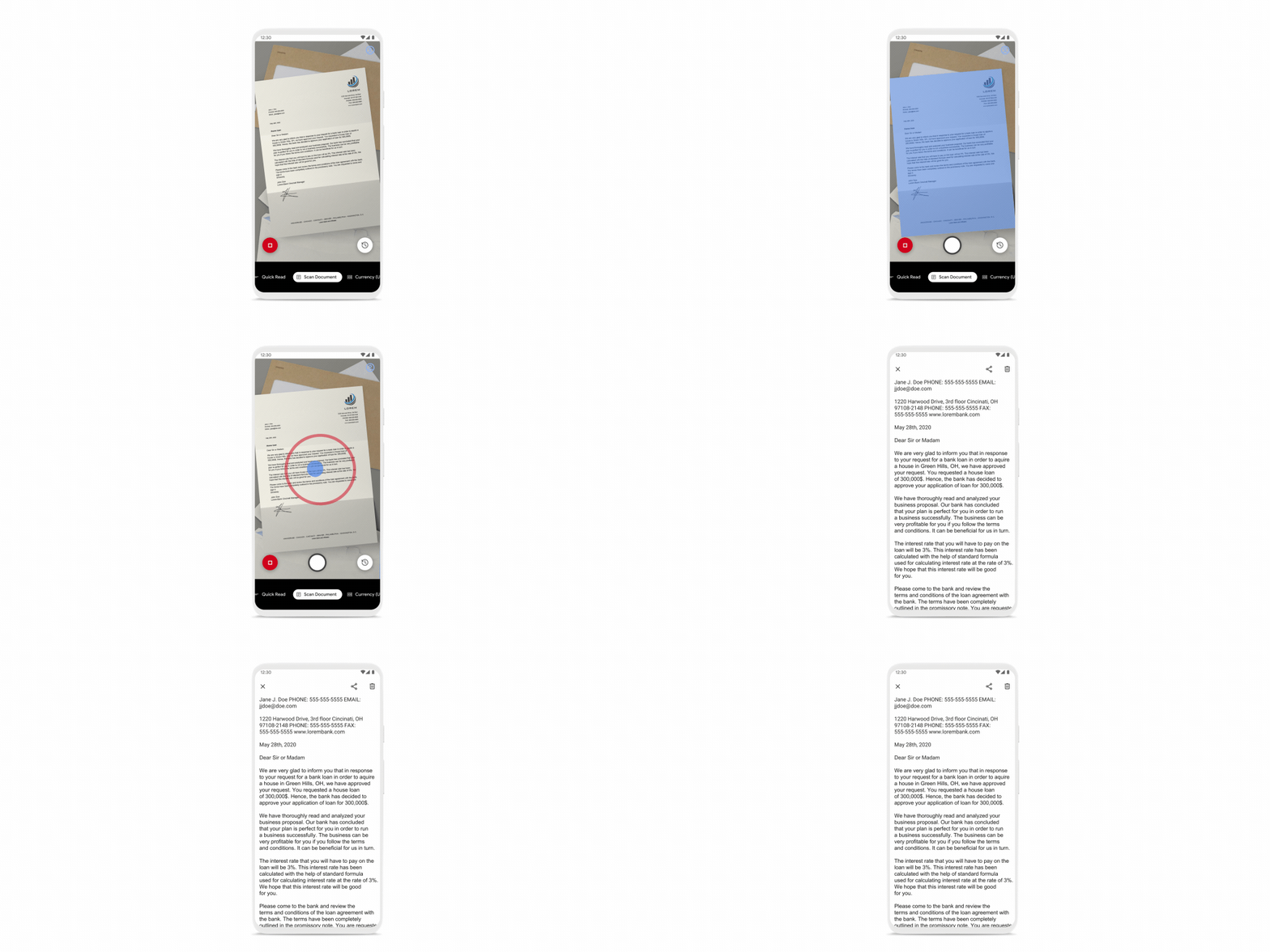
Download Lookout on Google Play today, available for all devices with more than 2GB of RAM running Android 6.0 and later.

via Android https://ift.tt/3fMgvL3
Instantly share files with people around you with Nearby Share
The Android community has long asked for a way to quickly share content with each other from their devices. So after years of development, Android is launching Nearby Share, a platform to enable reliable and easy sharing across thousands of Android phone models and billions of people.
Nearby Share is rolling out to Android 6.0+ phones today, making it easier to instantly share files, links, pictures and more with people around you, all while protecting your privacy.
Easily share content both online and offline
When you just want to quickly share something with a friend or someone nearby, it can be a hassle to open your messages, find a contact and then find the file you’d like to attach. Nearby Share allows you to cut down on that time with simple taps and see a list of devices in your proximity with which you can share content. Once you select the receiver, they will be notified with the option to either accept or decline the file. Nearby Share then automatically chooses the best protocol for fast and easy sharing using Bluetooth, Bluetooth Low Energy, WebRTC or peer-to-peer WiFi — allowing you to share even when you’re fully offline.
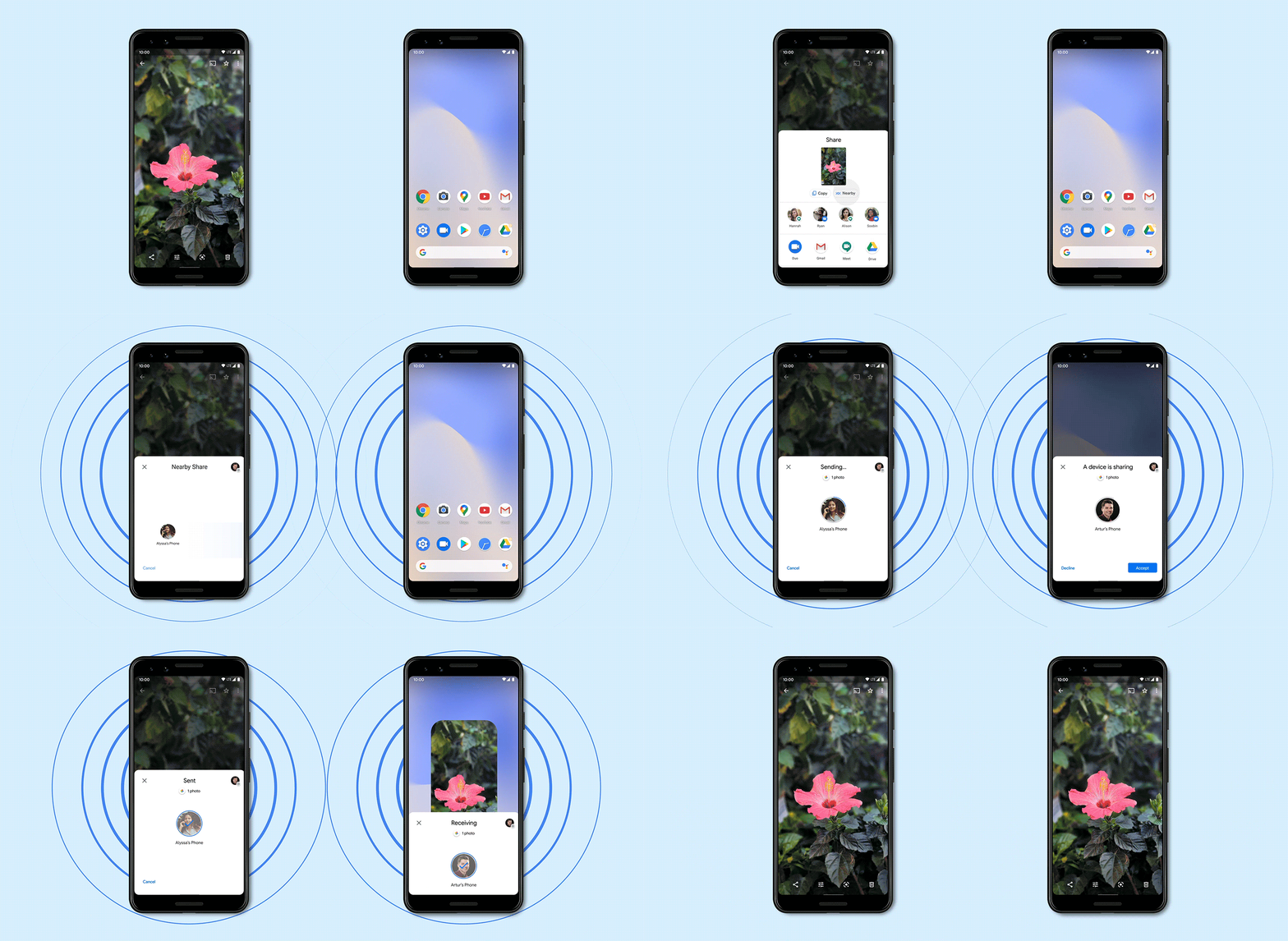
Safely share and receive files with those around you
Nearby Share was built with privacy at its core, so you can share and receive files with peace of mind. Now you don’t have to worry about exchanging contact information, because Nearby Share allows you to both send and receive files anonymously. It also allows you to adjust your privacy settings from your phone’s Quick Settings at any time. You can be “hidden,” visible to “some contacts” or visible to “all contacts,” so you never receive files that you didn’t ask for.
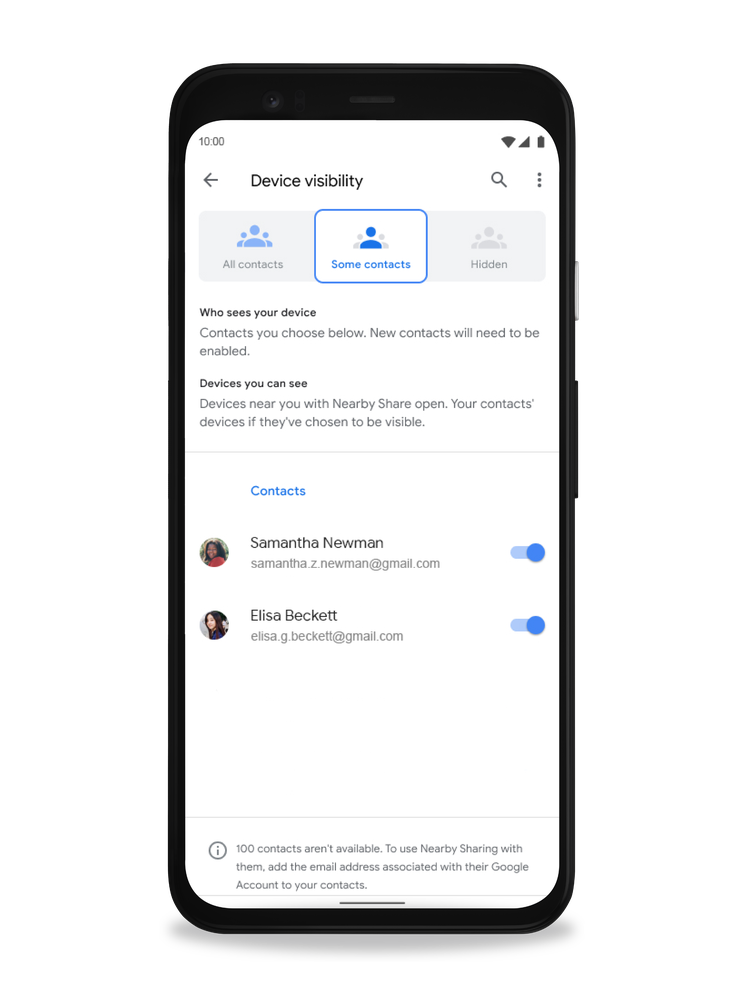
Works smoothly with Chromebooks
In the coming months, Nearby Share will work with Chromebooks so you can swiftly share files between an Android phone and a Chromebook, and vice versa. Chromebooks already have features that make them work especially well with Android, like Instant Tethering, and Nearby Share will make Android and Chromebook work even better together.
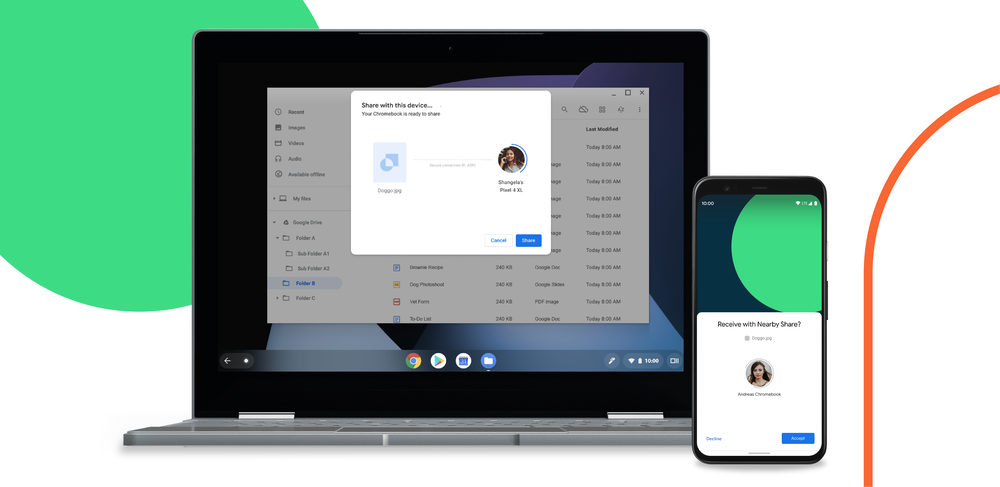
Select Google Pixel and Samsung devices will be the first smartphones to receive Nearby Share starting today. We will continue to work with our partners to bring Nearby Share to more smartphones in the Android ecosystem over the next few weeks. Visit our support page to learn more about how to enable Nearby Share and adjust your visibility settings.

via Android https://ift.tt/2Plh2Jb